This is an old revision of the document!
Warning: compact(): Undefined variable $format in /home/especiais/epsatisep/public_html/2016/EPS2016-wiki3/lib/plugins/numberedheadings/syntax.php on line 126
Warning: compact(): Undefined variable $format in /home/especiais/epsatisep/public_html/2016/EPS2016-wiki3/lib/plugins/numberedheadings/syntax.php on line 126
Warning: compact(): Undefined variable $format in /home/especiais/epsatisep/public_html/2016/EPS2016-wiki3/lib/plugins/numberedheadings/syntax.php on line 126
Warning: compact(): Undefined variable $format in /home/especiais/epsatisep/public_html/2016/EPS2016-wiki3/lib/plugins/numberedheadings/syntax.php on line 126
Warning: compact(): Undefined variable $format in /home/especiais/epsatisep/public_html/2016/EPS2016-wiki3/lib/plugins/numberedheadings/syntax.php on line 126
Warning: compact(): Undefined variable $format in /home/especiais/epsatisep/public_html/2016/EPS2016-wiki3/lib/plugins/numberedheadings/syntax.php on line 126
Warning: compact(): Undefined variable $format in /home/especiais/epsatisep/public_html/2016/EPS2016-wiki3/lib/plugins/numberedheadings/syntax.php on line 126
Warning: compact(): Undefined variable $format in /home/especiais/epsatisep/public_html/2016/EPS2016-wiki3/lib/plugins/numberedheadings/syntax.php on line 126
Warning: compact(): Undefined variable $format in /home/especiais/epsatisep/public_html/2016/EPS2016-wiki3/lib/plugins/numberedheadings/syntax.php on line 126
Warning: compact(): Undefined variable $format in /home/especiais/epsatisep/public_html/2016/EPS2016-wiki3/lib/plugins/numberedheadings/syntax.php on line 126
Warning: compact(): Undefined variable $format in /home/especiais/epsatisep/public_html/2016/EPS2016-wiki3/lib/plugins/numberedheadings/syntax.php on line 126
Warning: compact(): Undefined variable $format in /home/especiais/epsatisep/public_html/2016/EPS2016-wiki3/lib/plugins/numberedheadings/syntax.php on line 126
Warning: compact(): Undefined variable $format in /home/especiais/epsatisep/public_html/2016/EPS2016-wiki3/lib/plugins/numberedheadings/syntax.php on line 126
Warning: compact(): Undefined variable $format in /home/especiais/epsatisep/public_html/2016/EPS2016-wiki3/lib/plugins/numberedheadings/syntax.php on line 126
Warning: compact(): Undefined variable $format in /home/especiais/epsatisep/public_html/2016/EPS2016-wiki3/lib/plugins/numberedheadings/syntax.php on line 126
Warning: compact(): Undefined variable $format in /home/especiais/epsatisep/public_html/2016/EPS2016-wiki3/lib/plugins/numberedheadings/syntax.php on line 126
Warning: compact(): Undefined variable $format in /home/especiais/epsatisep/public_html/2016/EPS2016-wiki3/lib/plugins/numberedheadings/syntax.php on line 126
Warning: compact(): Undefined variable $format in /home/especiais/epsatisep/public_html/2016/EPS2016-wiki3/lib/plugins/numberedheadings/syntax.php on line 126
Warning: compact(): Undefined variable $format in /home/especiais/epsatisep/public_html/2016/EPS2016-wiki3/lib/plugins/numberedheadings/syntax.php on line 126
Warning: compact(): Undefined variable $format in /home/especiais/epsatisep/public_html/2016/EPS2016-wiki3/lib/plugins/numberedheadings/syntax.php on line 126
Warning: compact(): Undefined variable $format in /home/especiais/epsatisep/public_html/2016/EPS2016-wiki3/lib/plugins/numberedheadings/syntax.php on line 126
Warning: compact(): Undefined variable $format in /home/especiais/epsatisep/public_html/2016/EPS2016-wiki3/lib/plugins/numberedheadings/syntax.php on line 126
Warning: compact(): Undefined variable $format in /home/especiais/epsatisep/public_html/2016/EPS2016-wiki3/lib/plugins/numberedheadings/syntax.php on line 126
Warning: compact(): Undefined variable $format in /home/especiais/epsatisep/public_html/2016/EPS2016-wiki3/lib/plugins/numberedheadings/syntax.php on line 126
Warning: compact(): Undefined variable $format in /home/especiais/epsatisep/public_html/2016/EPS2016-wiki3/lib/plugins/numberedheadings/syntax.php on line 126
Warning: compact(): Undefined variable $format in /home/especiais/epsatisep/public_html/2016/EPS2016-wiki3/lib/plugins/numberedheadings/syntax.php on line 126
Warning: compact(): Undefined variable $format in /home/especiais/epsatisep/public_html/2016/EPS2016-wiki3/lib/plugins/numberedheadings/syntax.php on line 126
Warning: compact(): Undefined variable $format in /home/especiais/epsatisep/public_html/2016/EPS2016-wiki3/lib/plugins/numberedheadings/syntax.php on line 126
Warning: compact(): Undefined variable $format in /home/especiais/epsatisep/public_html/2016/EPS2016-wiki3/lib/plugins/numberedheadings/syntax.php on line 126
Warning: compact(): Undefined variable $format in /home/especiais/epsatisep/public_html/2016/EPS2016-wiki3/lib/plugins/numberedheadings/syntax.php on line 126
Warning: compact(): Undefined variable $format in /home/especiais/epsatisep/public_html/2016/EPS2016-wiki3/lib/plugins/numberedheadings/syntax.php on line 126
Warning: compact(): Undefined variable $format in /home/especiais/epsatisep/public_html/2016/EPS2016-wiki3/lib/plugins/numberedheadings/syntax.php on line 126
Warning: compact(): Undefined variable $format in /home/especiais/epsatisep/public_html/2016/EPS2016-wiki3/lib/plugins/numberedheadings/syntax.php on line 126
Warning: compact(): Undefined variable $format in /home/especiais/epsatisep/public_html/2016/EPS2016-wiki3/lib/plugins/numberedheadings/syntax.php on line 126
Warning: compact(): Undefined variable $format in /home/especiais/epsatisep/public_html/2016/EPS2016-wiki3/lib/plugins/numberedheadings/syntax.php on line 126
Warning: compact(): Undefined variable $format in /home/especiais/epsatisep/public_html/2016/EPS2016-wiki3/lib/plugins/numberedheadings/syntax.php on line 126
Warning: compact(): Undefined variable $format in /home/especiais/epsatisep/public_html/2016/EPS2016-wiki3/lib/plugins/numberedheadings/syntax.php on line 126
Warning: compact(): Undefined variable $format in /home/especiais/epsatisep/public_html/2016/EPS2016-wiki3/lib/plugins/numberedheadings/syntax.php on line 126
Warning: compact(): Undefined variable $format in /home/especiais/epsatisep/public_html/2016/EPS2016-wiki3/lib/plugins/numberedheadings/syntax.php on line 126
Warning: compact(): Undefined variable $format in /home/especiais/epsatisep/public_html/2016/EPS2016-wiki3/lib/plugins/numberedheadings/syntax.php on line 126
Warning: compact(): Undefined variable $format in /home/especiais/epsatisep/public_html/2016/EPS2016-wiki3/lib/plugins/numberedheadings/syntax.php on line 126
Warning: compact(): Undefined variable $format in /home/especiais/epsatisep/public_html/2016/EPS2016-wiki3/lib/plugins/numberedheadings/syntax.php on line 126
Warning: compact(): Undefined variable $format in /home/especiais/epsatisep/public_html/2016/EPS2016-wiki3/lib/plugins/numberedheadings/syntax.php on line 126
Warning: compact(): Undefined variable $format in /home/especiais/epsatisep/public_html/2016/EPS2016-wiki3/lib/plugins/numberedheadings/syntax.php on line 126
Warning: compact(): Undefined variable $format in /home/especiais/epsatisep/public_html/2016/EPS2016-wiki3/lib/plugins/numberedheadings/syntax.php on line 126
Warning: compact(): Undefined variable $format in /home/especiais/epsatisep/public_html/2016/EPS2016-wiki3/lib/plugins/numberedheadings/syntax.php on line 126
Warning: compact(): Undefined variable $format in /home/especiais/epsatisep/public_html/2016/EPS2016-wiki3/lib/plugins/numberedheadings/syntax.php on line 126
Warning: compact(): Undefined variable $format in /home/especiais/epsatisep/public_html/2016/EPS2016-wiki3/lib/plugins/numberedheadings/syntax.php on line 126
Warning: compact(): Undefined variable $format in /home/especiais/epsatisep/public_html/2016/EPS2016-wiki3/lib/plugins/numberedheadings/syntax.php on line 126
Warning: compact(): Undefined variable $format in /home/especiais/epsatisep/public_html/2016/EPS2016-wiki3/lib/plugins/numberedheadings/syntax.php on line 126
Warning: compact(): Undefined variable $format in /home/especiais/epsatisep/public_html/2016/EPS2016-wiki3/lib/plugins/numberedheadings/syntax.php on line 126
Warning: compact(): Undefined variable $format in /home/especiais/epsatisep/public_html/2016/EPS2016-wiki3/lib/plugins/numberedheadings/syntax.php on line 126
Warning: compact(): Undefined variable $format in /home/especiais/epsatisep/public_html/2016/EPS2016-wiki3/lib/plugins/numberedheadings/syntax.php on line 126
Warning: compact(): Undefined variable $format in /home/especiais/epsatisep/public_html/2016/EPS2016-wiki3/lib/plugins/numberedheadings/syntax.php on line 126
Warning: compact(): Undefined variable $format in /home/especiais/epsatisep/public_html/2016/EPS2016-wiki3/lib/plugins/numberedheadings/syntax.php on line 126
Warning: compact(): Undefined variable $format in /home/especiais/epsatisep/public_html/2016/EPS2016-wiki3/lib/plugins/numberedheadings/syntax.php on line 126
Warning: compact(): Undefined variable $format in /home/especiais/epsatisep/public_html/2016/EPS2016-wiki3/lib/plugins/numberedheadings/syntax.php on line 126
Warning: compact(): Undefined variable $format in /home/especiais/epsatisep/public_html/2016/EPS2016-wiki3/lib/plugins/numberedheadings/syntax.php on line 126
Warning: compact(): Undefined variable $format in /home/especiais/epsatisep/public_html/2016/EPS2016-wiki3/lib/plugins/numberedheadings/syntax.php on line 126
Warning: compact(): Undefined variable $format in /home/especiais/epsatisep/public_html/2016/EPS2016-wiki3/lib/plugins/numberedheadings/syntax.php on line 126
Warning: compact(): Undefined variable $format in /home/especiais/epsatisep/public_html/2016/EPS2016-wiki3/lib/plugins/numberedheadings/syntax.php on line 126
Warning: compact(): Undefined variable $format in /home/especiais/epsatisep/public_html/2016/EPS2016-wiki3/lib/plugins/numberedheadings/syntax.php on line 126
Warning: compact(): Undefined variable $format in /home/especiais/epsatisep/public_html/2016/EPS2016-wiki3/lib/plugins/numberedheadings/syntax.php on line 126
Warning: compact(): Undefined variable $format in /home/especiais/epsatisep/public_html/2016/EPS2016-wiki3/lib/plugins/numberedheadings/syntax.php on line 126
Warning: compact(): Undefined variable $format in /home/especiais/epsatisep/public_html/2016/EPS2016-wiki3/lib/plugins/numberedheadings/syntax.php on line 126
Warning: compact(): Undefined variable $format in /home/especiais/epsatisep/public_html/2016/EPS2016-wiki3/lib/plugins/numberedheadings/syntax.php on line 126
Warning: compact(): Undefined variable $format in /home/especiais/epsatisep/public_html/2016/EPS2016-wiki3/lib/plugins/numberedheadings/syntax.php on line 126
Warning: compact(): Undefined variable $format in /home/especiais/epsatisep/public_html/2016/EPS2016-wiki3/lib/plugins/numberedheadings/syntax.php on line 126
Warning: compact(): Undefined variable $format in /home/especiais/epsatisep/public_html/2016/EPS2016-wiki3/lib/plugins/numberedheadings/syntax.php on line 126
Warning: compact(): Undefined variable $format in /home/especiais/epsatisep/public_html/2016/EPS2016-wiki3/lib/plugins/numberedheadings/syntax.php on line 126
Warning: compact(): Undefined variable $format in /home/especiais/epsatisep/public_html/2016/EPS2016-wiki3/lib/plugins/numberedheadings/syntax.php on line 126
Warning: compact(): Undefined variable $format in /home/especiais/epsatisep/public_html/2016/EPS2016-wiki3/lib/plugins/numberedheadings/syntax.php on line 126
Warning: compact(): Undefined variable $format in /home/especiais/epsatisep/public_html/2016/EPS2016-wiki3/lib/plugins/numberedheadings/syntax.php on line 126
Warning: compact(): Undefined variable $format in /home/especiais/epsatisep/public_html/2016/EPS2016-wiki3/lib/plugins/numberedheadings/syntax.php on line 126
Warning: compact(): Undefined variable $format in /home/especiais/epsatisep/public_html/2016/EPS2016-wiki3/lib/plugins/numberedheadings/syntax.php on line 126
Warning: compact(): Undefined variable $format in /home/especiais/epsatisep/public_html/2016/EPS2016-wiki3/lib/plugins/numberedheadings/syntax.php on line 126
Warning: compact(): Undefined variable $format in /home/especiais/epsatisep/public_html/2016/EPS2016-wiki3/lib/plugins/numberedheadings/syntax.php on line 126
Warning: compact(): Undefined variable $format in /home/especiais/epsatisep/public_html/2016/EPS2016-wiki3/lib/plugins/numberedheadings/syntax.php on line 126
Warning: compact(): Undefined variable $format in /home/especiais/epsatisep/public_html/2016/EPS2016-wiki3/lib/plugins/numberedheadings/syntax.php on line 126
Warning: compact(): Undefined variable $format in /home/especiais/epsatisep/public_html/2016/EPS2016-wiki3/lib/plugins/numberedheadings/syntax.php on line 126
Warning: compact(): Undefined variable $format in /home/especiais/epsatisep/public_html/2016/EPS2016-wiki3/lib/plugins/numberedheadings/syntax.php on line 126
Warning: compact(): Undefined variable $format in /home/especiais/epsatisep/public_html/2016/EPS2016-wiki3/lib/plugins/numberedheadings/syntax.php on line 126
Warning: compact(): Undefined variable $format in /home/especiais/epsatisep/public_html/2016/EPS2016-wiki3/lib/plugins/numberedheadings/syntax.php on line 126
Warning: compact(): Undefined variable $format in /home/especiais/epsatisep/public_html/2016/EPS2016-wiki3/lib/plugins/numberedheadings/syntax.php on line 126
Warning: compact(): Undefined variable $format in /home/especiais/epsatisep/public_html/2016/EPS2016-wiki3/lib/plugins/numberedheadings/syntax.php on line 126
Warning: compact(): Undefined variable $format in /home/especiais/epsatisep/public_html/2016/EPS2016-wiki3/lib/plugins/numberedheadings/syntax.php on line 126
Warning: compact(): Undefined variable $format in /home/especiais/epsatisep/public_html/2016/EPS2016-wiki3/lib/plugins/numberedheadings/syntax.php on line 126
Warning: compact(): Undefined variable $format in /home/especiais/epsatisep/public_html/2016/EPS2016-wiki3/lib/plugins/numberedheadings/syntax.php on line 126
Warning: compact(): Undefined variable $format in /home/especiais/epsatisep/public_html/2016/EPS2016-wiki3/lib/plugins/numberedheadings/syntax.php on line 126
Warning: compact(): Undefined variable $format in /home/especiais/epsatisep/public_html/2016/EPS2016-wiki3/lib/plugins/numberedheadings/syntax.php on line 126
Warning: compact(): Undefined variable $format in /home/especiais/epsatisep/public_html/2016/EPS2016-wiki3/lib/plugins/numberedheadings/syntax.php on line 126
Warning: compact(): Undefined variable $format in /home/especiais/epsatisep/public_html/2016/EPS2016-wiki3/lib/plugins/numberedheadings/syntax.php on line 126
Warning: compact(): Undefined variable $format in /home/especiais/epsatisep/public_html/2016/EPS2016-wiki3/lib/plugins/numberedheadings/syntax.php on line 126
Warning: compact(): Undefined variable $format in /home/especiais/epsatisep/public_html/2016/EPS2016-wiki3/lib/plugins/numberedheadings/syntax.php on line 126
Warning: compact(): Undefined variable $format in /home/especiais/epsatisep/public_html/2016/EPS2016-wiki3/lib/plugins/numberedheadings/syntax.php on line 126
Warning: compact(): Undefined variable $format in /home/especiais/epsatisep/public_html/2016/EPS2016-wiki3/lib/plugins/numberedheadings/syntax.php on line 126
Warning: compact(): Undefined variable $format in /home/especiais/epsatisep/public_html/2016/EPS2016-wiki3/lib/plugins/numberedheadings/syntax.php on line 126
Warning: compact(): Undefined variable $format in /home/especiais/epsatisep/public_html/2016/EPS2016-wiki3/lib/plugins/numberedheadings/syntax.php on line 126
Warning: compact(): Undefined variable $format in /home/especiais/epsatisep/public_html/2016/EPS2016-wiki3/lib/plugins/numberedheadings/syntax.php on line 126
Warning: compact(): Undefined variable $format in /home/especiais/epsatisep/public_html/2016/EPS2016-wiki3/lib/plugins/numberedheadings/syntax.php on line 126
Warning: compact(): Undefined variable $format in /home/especiais/epsatisep/public_html/2016/EPS2016-wiki3/lib/plugins/numberedheadings/syntax.php on line 126
Warning: compact(): Undefined variable $format in /home/especiais/epsatisep/public_html/2016/EPS2016-wiki3/lib/plugins/numberedheadings/syntax.php on line 126
Warning: compact(): Undefined variable $format in /home/especiais/epsatisep/public_html/2016/EPS2016-wiki3/lib/plugins/numberedheadings/syntax.php on line 126
Warning: compact(): Undefined variable $format in /home/especiais/epsatisep/public_html/2016/EPS2016-wiki3/lib/plugins/numberedheadings/syntax.php on line 126
Warning: compact(): Undefined variable $format in /home/especiais/epsatisep/public_html/2016/EPS2016-wiki3/lib/plugins/numberedheadings/syntax.php on line 126
Warning: compact(): Undefined variable $format in /home/especiais/epsatisep/public_html/2016/EPS2016-wiki3/lib/plugins/numberedheadings/syntax.php on line 126
Warning: compact(): Undefined variable $format in /home/especiais/epsatisep/public_html/2016/EPS2016-wiki3/lib/plugins/numberedheadings/syntax.php on line 126
Warning: compact(): Undefined variable $format in /home/especiais/epsatisep/public_html/2016/EPS2016-wiki3/lib/plugins/numberedheadings/syntax.php on line 126
Warning: compact(): Undefined variable $format in /home/especiais/epsatisep/public_html/2016/EPS2016-wiki3/lib/plugins/numberedheadings/syntax.php on line 126
Warning: compact(): Undefined variable $format in /home/especiais/epsatisep/public_html/2016/EPS2016-wiki3/lib/plugins/numberedheadings/syntax.php on line 126
Warning: compact(): Undefined variable $format in /home/especiais/epsatisep/public_html/2016/EPS2016-wiki3/lib/plugins/numberedheadings/syntax.php on line 126
Warning: compact(): Undefined variable $format in /home/especiais/epsatisep/public_html/2016/EPS2016-wiki3/lib/plugins/numberedheadings/syntax.php on line 126
Warning: compact(): Undefined variable $format in /home/especiais/epsatisep/public_html/2016/EPS2016-wiki3/lib/plugins/numberedheadings/syntax.php on line 126
Warning: compact(): Undefined variable $format in /home/especiais/epsatisep/public_html/2016/EPS2016-wiki3/lib/plugins/numberedheadings/syntax.php on line 126
Warning: compact(): Undefined variable $format in /home/especiais/epsatisep/public_html/2016/EPS2016-wiki3/lib/plugins/numberedheadings/syntax.php on line 126
Warning: compact(): Undefined variable $format in /home/especiais/epsatisep/public_html/2016/EPS2016-wiki3/lib/plugins/numberedheadings/syntax.php on line 126
Warning: compact(): Undefined variable $format in /home/especiais/epsatisep/public_html/2016/EPS2016-wiki3/lib/plugins/numberedheadings/syntax.php on line 126
Warning: compact(): Undefined variable $format in /home/especiais/epsatisep/public_html/2016/EPS2016-wiki3/lib/plugins/numberedheadings/syntax.php on line 126
Warning: compact(): Undefined variable $format in /home/especiais/epsatisep/public_html/2016/EPS2016-wiki3/lib/plugins/numberedheadings/syntax.php on line 126
Warning: compact(): Undefined variable $format in /home/especiais/epsatisep/public_html/2016/EPS2016-wiki3/lib/plugins/numberedheadings/syntax.php on line 126
Warning: compact(): Undefined variable $format in /home/especiais/epsatisep/public_html/2016/EPS2016-wiki3/lib/plugins/numberedheadings/syntax.php on line 126
Warning: compact(): Undefined variable $format in /home/especiais/epsatisep/public_html/2016/EPS2016-wiki3/lib/plugins/numberedheadings/syntax.php on line 126
Warning: compact(): Undefined variable $format in /home/especiais/epsatisep/public_html/2016/EPS2016-wiki3/lib/plugins/numberedheadings/syntax.php on line 126
Warning: compact(): Undefined variable $format in /home/especiais/epsatisep/public_html/2016/EPS2016-wiki3/lib/plugins/numberedheadings/syntax.php on line 126
Warning: compact(): Undefined variable $format in /home/especiais/epsatisep/public_html/2016/EPS2016-wiki3/lib/plugins/numberedheadings/syntax.php on line 126
Warning: compact(): Undefined variable $format in /home/especiais/epsatisep/public_html/2016/EPS2016-wiki3/lib/plugins/numberedheadings/syntax.php on line 126
Warning: compact(): Undefined variable $format in /home/especiais/epsatisep/public_html/2016/EPS2016-wiki3/lib/plugins/numberedheadings/syntax.php on line 126
Warning: compact(): Undefined variable $format in /home/especiais/epsatisep/public_html/2016/EPS2016-wiki3/lib/plugins/numberedheadings/syntax.php on line 126
Warning: compact(): Undefined variable $format in /home/especiais/epsatisep/public_html/2016/EPS2016-wiki3/lib/plugins/numberedheadings/syntax.php on line 126
Warning: compact(): Undefined variable $format in /home/especiais/epsatisep/public_html/2016/EPS2016-wiki3/lib/plugins/numberedheadings/syntax.php on line 126
Warning: Trying to access array offset on null in /home/especiais/epsatisep/public_html/2016/EPS2016-wiki3/lib/plugins/caption/syntax/reference.php on line 68
Warning: Undefined array key "eduT" in /home/especiais/epsatisep/public_html/2016/EPS2016-wiki3/lib/plugins/caption/syntax/reference.php on line 68
Warning: Undefined array key "t2" in /home/especiais/epsatisep/public_html/2016/EPS2016-wiki3/lib/plugins/caption/syntax/reference.php on line 68
Warning: Undefined array key "wp" in /home/especiais/epsatisep/public_html/2016/EPS2016-wiki3/lib/plugins/caption/syntax/reference.php on line 68
Warning: Undefined array key "t5" in /home/especiais/epsatisep/public_html/2016/EPS2016-wiki3/lib/plugins/caption/syntax/reference.php on line 68
Warning: Undefined array key "t7" in /home/especiais/epsatisep/public_html/2016/EPS2016-wiki3/lib/plugins/caption/syntax/reference.php on line 68
Warning: Undefined array key "t8" in /home/especiais/epsatisep/public_html/2016/EPS2016-wiki3/lib/plugins/caption/syntax/reference.php on line 68
Warning: Undefined array key "t9" in /home/especiais/epsatisep/public_html/2016/EPS2016-wiki3/lib/plugins/caption/syntax/reference.php on line 68
Warning: Undefined array key "a2" in /home/especiais/epsatisep/public_html/2016/EPS2016-wiki3/lib/plugins/caption/syntax/reference.php on line 68
Warning: Undefined array key "a3" in /home/especiais/epsatisep/public_html/2016/EPS2016-wiki3/lib/plugins/caption/syntax/reference.php on line 68
Warning: Undefined array key "t10" in /home/especiais/epsatisep/public_html/2016/EPS2016-wiki3/lib/plugins/caption/syntax/reference.php on line 68
Warning: Undefined array key "mt11" in /home/especiais/epsatisep/public_html/2016/EPS2016-wiki3/lib/plugins/caption/syntax/reference.php on line 68
Warning: Undefined array key "tw1" in /home/especiais/epsatisep/public_html/2016/EPS2016-wiki3/lib/plugins/caption/syntax/reference.php on line 68
Warning: Undefined array key "raci" in /home/especiais/epsatisep/public_html/2016/EPS2016-wiki3/lib/plugins/caption/syntax/reference.php on line 68
Warning: Undefined array key "t23" in /home/especiais/epsatisep/public_html/2016/EPS2016-wiki3/lib/plugins/caption/syntax/reference.php on line 68
Warning: Undefined array key "tuba" in /home/especiais/epsatisep/public_html/2016/EPS2016-wiki3/lib/plugins/caption/syntax/reference.php on line 68
Warning: Undefined array key "rys2" in /home/especiais/epsatisep/public_html/2016/EPS2016-wiki3/lib/plugins/caption/syntax/reference.php on line 68
Warning: Undefined array key "figsales" in /home/especiais/epsatisep/public_html/2016/EPS2016-wiki3/lib/plugins/caption/syntax/reference.php on line 68
Warning: Undefined array key "f56" in /home/especiais/epsatisep/public_html/2016/EPS2016-wiki3/lib/plugins/caption/syntax/reference.php on line 68
Warning: Undefined array key "tabdem" in /home/especiais/epsatisep/public_html/2016/EPS2016-wiki3/lib/plugins/caption/syntax/reference.php on line 68
Warning: Undefined array key "preSch" in /home/especiais/epsatisep/public_html/2016/EPS2016-wiki3/lib/plugins/caption/syntax/reference.php on line 68
Warning: Undefined array key "elSch" in /home/especiais/epsatisep/public_html/2016/EPS2016-wiki3/lib/plugins/caption/syntax/reference.php on line 68
Warning: Undefined array key "strDra" in /home/especiais/epsatisep/public_html/2016/EPS2016-wiki3/lib/plugins/caption/syntax/reference.php on line 68
Warning: Undefined array key "3dM" in /home/especiais/epsatisep/public_html/2016/EPS2016-wiki3/lib/plugins/caption/syntax/reference.php on line 68
Warning: Undefined array key "3dM2" in /home/especiais/epsatisep/public_html/2016/EPS2016-wiki3/lib/plugins/caption/syntax/reference.php on line 68
Warning: Undefined array key "3dM3" in /home/especiais/epsatisep/public_html/2016/EPS2016-wiki3/lib/plugins/caption/syntax/reference.php on line 68
Warning: Undefined array key "3dM4" in /home/especiais/epsatisep/public_html/2016/EPS2016-wiki3/lib/plugins/caption/syntax/reference.php on line 68
Warning: Undefined array key "b5" in /home/especiais/epsatisep/public_html/2016/EPS2016-wiki3/lib/plugins/caption/syntax/reference.php on line 68
Warning: Undefined array key "test1" in /home/especiais/epsatisep/public_html/2016/EPS2016-wiki3/lib/plugins/caption/syntax/reference.php on line 68
Table of Contents
Report
Didactic Robotic Fish Kit
Author(s):
Achim Reinhardt
Alvaro Chousa Esteban
Justyna Urbanska
Martin McPhee
Terry Greene
Acknowledgement
Team three would like to extend their appreciation towards ISEP and the EPS program. They brought this wonderful team together and gave them the opportunity and resources to complete a truly special project.
This team is also compelled to express gratitude for the members of ISEP's EPS advisory board, namely Abel Duarte, Fernando Ferreira, Benedita Malheiro, Cristina Ribeiro, Manuel Silva, Paulo Ferreira, Pedro Guedes. This group of individuals provided invaluable resources, providing patient advice and direction throughout the course of the project.
Finally, team members would be remiss in not extending sincerest deepest gratitude to ITSector, the company sponsorship behind this project.
Glossary
| Abbreviation | Description |
|---|---|
| EPS | European Project Semester |
| ISEP | Instituto Superior de Engenharia do Porto |
| USB | Universal Serial Bus |
| EU | European Union |
| PLA | Polylactic Acid |
| ABS | Acrylonitrile butadiene styrene |
| PVA | Polyvinyl alcohol |
| SWOT | Strengths Weaknesses Opportunities & Threats |
| WBS | Work Breakdown Structure |
| STL | StereoLithography |
| IDE | Integrated Development Environment |
1. Introduction
1.1 Presentation
We are a multidisciplinary, international group of students brought together to work on a common project.
- Achim Reinhardt - Media Technology
- Alvaro Chousa Esteban - Engineering and Architecture
- Justyna Urbanska - Logistics Management
- Martin McPhee - Electrical, Electronic and Energy Engineering
- Terry Greene - Mechanical Engineering
The team members are from Germany, Spain, Poland, Scotland and the U.S.A respectively. We arrived to Porto, Portugal to take part in a European Project Semester at the Instituto Superior de Engenharia do Porto. With such a diverse background, each team member comes with their own unique set of skills and knowledge. We are a creative, ambitious and hard working group of young people who aim to continue improving, developing and expanding on our horizons.
1.2 Motivation
All members of Team Three choose to participate in EPS, believing it an amazing opportunity to develop their skills and gain exposure to students of varied backgrounds and fields of study. Team members relish the opportunity to learn about other cultures and increase both their technical and soft skills background.
When faced with the choice of a project for the semester, Team Three was presented with a wide range of options. Together, they were able to unanimously selected the Didactic Robotic Fish as the project to proceed with. Team members believed that their skill sets suited the project well, and that there is a place in the market for an inexpensive, educational toy to teach young children programming.
1.3 Problem
The 21st century is a digital world. In this world, the technologically literate flourish, while those stuck in the ways of the past may be left there. If technological education is left solely to a wildly varying set of international education standards, many children will miss out on the exposure to programming and electronics during their formative years. However if young children are introduced to these concepts, in the right way, it can foster a desire for continued learning and a much deeper understanding later in life.
A few educational toys, meant to introduce kids to programming and/or electronics are currently on the market. However these toys are offered at a relatively high price, effectively plucking them from the hands of many children in low income families. However, these are the children with the greatest need to access such toys. The pursuit of technical knowledge, which can be ignited with educational toys, is exactly tool a person needs to move up the socio-economic ladder.
As technology grows, it has also been becoming more successfully. Zettabytes of information is available on-line, 3D printing has brought fast custom manufacturing to a wide range of users, and new opensource technology and software is being created and shared every day. The convergence of these factors allows any motivated individual, to complete tasks that a decade ago would have only been feasible for the well educated and well financed. Team Three is using these resources and technologies to create the opensource didactic programming toy, Bubbles. Bubbles will be inexpensive enough to be wildly more accessible than similar products, and since it is open source, the design and programming will forever be open to improvement.
1.4 Objectives
Team Three's primary aim is to create an innovative, fun, and engaging product that will teach young children the basics of programming. The end product needs to be attractive to children and parents, and simple enough for someone with no prior programming knowledge to use. In order to engage children´s curiosity and enthusiasm, the products learning curve should allow steady progress, remaining fun with a low to medium degree of difficulty. Since bubbles is a child's toy, its construction should be robust enough to survive mild abuse.
To supplement the toy itself, the product will come with a comprehensive digital user manual as well as website children and parents can turn to for fun activities and to answer any further questions.
1.5 Requirements
The prototype of Bubbles will be required to meet the following standards:
- Waterproof construction
- At least one degree of freedom
- Use low cost hardware solutions
- Use open source software
- A minimal number of standard batteries (four 1.5 V AA batteries or one 9 V battery)
- Create the project website to provide all information needed to replicate the robot (drawings, components, source code, etc.) in PT and EN as well as instruction scripts with some basic experiments
- Reuse the provided materials
- Keep construction and development cost under 50€
The above are the project requirements as sated by the project proposal. However, it is also important to consider requirements which arise when examining the end users' needs. Since bubbles is a child's toy, its construction and operation should be very simple, and the design must be robust enough to survive minor falls and the like. Additionally, the design should be attractive to children, and it is essential that the product has a didactic element. Bubbles as a teaching tool is how parents will be attracted to the product and how this toy can really make a difference in the world.
1.6 Functional Tests
A multitude of tests will be required to determine if Bubbles is prepared to be released to a commercial environment. A series of test both on dry land and in the water are outlined below.
1.6.0.1 Dry Land Tests
- Test if tail linkage is operational
- Test if the lateral fins will rotate to commanded angels
- Test LED control
- Test custom block programming language to ensure desired results
1.6.0.2 In Water Tests
- Test if lateral fin servos are waterproof
- Fully submerge Bubbles to test if body is waterproof (the only electronics inside for the first test should be the lateral fin servos, LED, and the on/off switch)
- Test Bubbles buoyancy with all functional elements installed
- Test forward motion
- Test Bubbles ability to turn
1.7 Project Planning
During the first week Team Three completed a Gantt chart which was kept updated throughout the semester. This simple tool helped members stay on schedule, and helped the team divide up the tasks to the most qualified team members. Once the series of semester tasks were laid out, it was simple for each team member to identify where their skills and interests were well suited for tasks. After discussing individual strengths and weaknesses, the team was able to settle on the division of labor outlined in table 1.
| Task | Responsible |
|---|---|
| Planning | |
| Find the tasks | All |
| Create the Gantt | All |
| System Diagrams & Structural Drafts | Álvaro |
| System Schematics & Structural Drawings | Álvaro |
| Research | |
| Physical Characteristics Fish | Martin, Álvaro |
| Programming Research | Achim |
| Targets | All |
| Design | Terry, Alvaro |
| Engineering Development | Terry, Martin |
| State of the Art | All |
| Marketing Study | |
| Compare suppliers | Justyna |
| Compare budget and the project | Justyna |
| Modifications | All |
| Materials | |
| What | Achim, Terry |
| Quantity | Achim, Terry |
| Prototyping | |
| Materials | All |
| Design | Terry, Álvaro |
| Construction | All |
| Functional Tests | All |
| Improvement/modification | All |
| Report/Presentation | |
| Upload Final Report, Presentation, Video, Paper, Poster, Manual and Website | All |
| Final Presentation, Individual Discussion and Assessment | All |
| Wiki | |
| Update the wiki with all correction suggestions | All |
| Hand in a CD with the corrected deliverables together with all code produced to the EPS coordinator | All |
| Hand in one printed exemplar of the corrected report to the EPS coordinator | All |
| Final Submission | |
| Hand in the prototype and user manual | All |
| Certificate | All |
All the members of team three agreed that dividing the tasks as outlined in table 1 represented the best allocation of labor and a fair work load for all. Obviously as you progress through a new project, unexpected work is bound to crop up. Such tasks are dealt with based on team member expertise and current availability.
1.8 Report Structure
The report is divided into eight major sections, each section in turn containing several minor sub-section. This division is outlined as follows:
1. Introduction: In this section, team three introduces its members and project. Why the specific project was under taken, what the final product will look like, and how this goal will be achieved is discussed.
2. State of the Art: In the state of the art, modern technologies and research relating to Team Three's project is identified and discussed.
3. Project Management: This section examines how Team Three planned and managed their project throughout the semester, it includes several charts and tables outlining the time line and task allocation.
4. Marketing Plan: The marketing plan discusses who the target market for Bubbles is and how to effectively market to them.
5. Eco-efficiency Measures for Sustainability: This section discusses how economic, environmental and social responsibility concerns apply to Bubbles, and outlines a life-cycle analysis for the product.
6. Ethical and Deontological Concerns: This section outlines what ethical concerns were taken into consideration during the development, and how they effected the project.
7. Project Development: The project development section covers the ongoing design and development of Bubbles.
8. Conclusion: The conclusion wraps up the report with a discussion of the projects accomplishments and potential future.
2. State of the Art
2.1 Introduction
The team has aimed to show what a didactic robotic fish is and to clearly show the market that will be targeted. Research was carried out on several existing products in the market, with several comparisons of products to identify the most suitable way to construct the project. It was recognised that the product, due to the target market of young children that the programming of the robot must be simple where movements would be restricted to left and right avoiding more complicated moves like for instance, moving up or enabling the robot to dive. This section will explore the products and materials that were investigated and reveal how the team came to the final conclusion of the chosen design for Bubbles.
2.2 Educational programming languages for children
2.2.1 Introduction
Nowadays, programming is apparent in every daily life and it is important to understand the process. Therefore, educational programming languages were developed to aid in this understanding. Educational programming languages are designed for children and beginners interested in learning about programming. The focus of these languages is on the simplification of the programming process to help new programmers become familiar with the main functions and principles. These educational programming languages are important for educational purposes and are used throughout educational institutions. Not only is programming taught in education circles, but it is also becoming popular in private sectors. In general, the different educational programming languages can be categorized as text-based languages, block-based languages and languages that use the concept of programming by demonstration.
2.2.2 Text-based programming
2.2.2.1 Karel
Karel is a text-based programming language for beginners. This language is used to control a robot named Karel. The robot is situated in a grid based environment. To control the it, there are five basic commands: move (moves to the next square), turnLeft (turns left), putBeeper (puts beeper on the square he stands), pickBeeper (takes beeper from the square he stands), and turnoff (ends the program). In Karel there are also control flow commands available, like if or while statements. Karels syntax has similarities to Pascal [1].
2.2.2.2 RoboMind
Like Karel, RoboMind is addressed to programming beginners and children. It uses a text-based language to move a robot in a two-dimensional world. The Robot is able to write on the ground, to pick up, and drop off objects called beacons. The functionality of RoboMind expands on the functions of Karel through advanced if-else statements, functions containing parameters, and recursive calls. The syntax of RoboMind is essentially a simplified version of C/C++ [2].
2.2.3 Block-based programming
2.2.3.1 Scratch
Scratch is a visual programming language based on block elements. The programming is realized by chaining different block elements together. With this approach, errors caused by syntax mistakes are avoided. The playful approach of this language engages children and teaches them basic programming concepts without being restricted by syntax standards. The colourful appearance is appropriate for children. Scratch includes the standard programming elements and even allows a kind of class structure. Scratch is available in a on-line version on the website and offline as a download [3].
2.2.3.2 Blockly
Blockly is another block based programming language and resembles Scratch. It is based on JavaScript and is open-source. Blockly provides a simple, basic set of operations and function, but its functionality may be expanded through the creation of custom blocks. Custom blocks can be created in an application called Block Factory or by writing new source code. [4]
2.2.3.3 S4A
S4A (Scratch for Arduino) is a modified version of Scratch. It extends the functionality of Scratch by adding elements for the communication with various Arduino components such as micro-controller functionalities, analog and digital writes and reads, and also for high level controls [5].
2.2.3.4 ArduBlock
ArduBlock is an extension for the Standard Arduino development environment. Its block based programming environment shares similarities with Scratch, Arduino, and Blockly. Additionally, ArduBlock is able to translate the block program into the Arduino programming language and transfers it directly to the Arduino development environment. As the user advances, this offers an easy transition into text-based programming [6].
2.2.3.5 Kodu Game Lab
Kodu Game Lab is an programming development environment based on different block elements. These elements represent specific actions and functions. When a certain conditions arise a self defined procedure of function will be conducted. In the case, there is no condition defined the procedures will be performed in a loop. The appearance of Kodu Game Lab has a clear structure. That is because of the use of icons to represent the different functions. In general the whole workspace of the program reminds more of a game than of a programming environment [7].
2.2.3.6 NXT-G
NXT-G is a graphical programming environment for the Lego NXT. Its programming is based on the manipulation of graphical blocks and wires. Via drag and drop, the user can combine different commands and requests. In this program, it is also possible to create sequences of parallel performed procedures. I addition to simple programs, NXT-G allows advanced connections to create a more complex program [8].
2.2.4 Programming by demonstration
2.2.4.1 Stagecast Creator
The virtual programming language Stagecast Creator is based on the concept of programming by demonstration.From these demonstrations the programming language creates rules. These rules define how an object reacts in the game. To teach an object to move, the object is first moved by the mouse. Based on this movement, the resulting movement of the object is created [9].
2.2.5 Summary
As shown in Table 2, the presented educational programming languages were compared in matters of the programming principle, the open-source availability and the compatibility to Arduino.
| Language | Programing principle | Open source | Compatible to Arduino |
|---|---|---|---|
| Karel | text-based | no | no |
| RoboMind | text based | yes | no |
| Scatch | block-based | yes | no |
| Blockly | block-based | yes | no |
| S4A | block-based | yes | yes (provides Arduino code) |
| ArduBlock | block-based | yes | yes (direct implemented in Arduino) |
| Kodu Game Lab | block-based | no | no |
| NXT-G | block-based | no | no |
| StageCast Creater | programming by demonstration | no | no |
2.2.6 Conclusion
Each of the presented education programming environment offers a good opportunity for taking first steps into programming. While text-based languages are more advanced because of the syntax restrictions and the complex handling, block-based languages offer a playful way to impart knowledge of programming to children. The programming by demonstration approach is also a great possibility for kids, but for the Didactic Fish Project it is not a viable solution. That is because of the independent nature of the robotic fish. Taking into consideration the the target group and the technical demands, block-based programming languages offer the best way to convey the thought process necessary, in programming to kids in a proper and playful way. With due regard to all the programming environments and considering their compatibility with Arduino, S4A and ArduBlock are clearly the best choices to create an appropriate educational programming environment for Bubbles. Because of its integration into Arduino IDE, ArduBlock offers new programmers a smoother transition into advanced and text-based programming. For this reasons, the decision was made to use ArduBlock to create the educational programming language for the project.
2.3 3D Printing Plastics
3D printing is a very versatile technology which can be used to produce parts in a wide range of plastics. Some special printers can even print in concrete and certain metals. So when choosing a material to print in, there are several options to consider, each with their own benefits and drawbacks. To assist in that decision, three of the most widely available plastics for printing were compared in Table 3. The table was provided by 3dprintingforbeginners.com.

As PVA is water soluble, it can be immediately discarded as a viable option for an aquatic robot. ABS and PLA are both potentially plastics which could be used for this project. ABS presents as the more durable and cheaper of the two plastics, where as PLA is advantageous due to its simple printing and the fact that it is a non-toxic and more environmentally friendly.
2.4 Waterproofing
In order to be successful the robotic fish should be able to be fully submerged in water without the risk of sinking or damaging any of the electronics. There are three key problem areas concerning the seaworthiness of the robotic fish. The first comes from allowing access to the internal working of the robotic fish. Both the developers and the end users of the fish will require use of any micro-controller's serial port as well as the ability to change or recharge the fish's battery. The second critical waterproofing area is any breaches in the fish's body that will allow for external LEDs, buttons, and fin movement. The final major waterproofing concern is due to the means of production; untreated, 3D printed plastic typically is not entirely waterproof. Even in a perfectly enclosed 3D printed structure, moister will seep in. In the Table 4 can be found the different methods with the advantages and disadvantages of each of them.
| Method | Advantages | Disadvantages |
|---|---|---|
| NeverWet or other hydrophobic spray [11] | Simple & Fast Application | Expensive Toxic materials |
| Heated Acetone Vapor [12] | Ascetically pleasing No mess Fast Application | Fire hazard Requires heating apparatus (may be homemade) May change tolerances Toxic materials |
| Room Temperature Acetone Vapor [13] | Ascetically pleasing No mess | Slow Requires treatment container (may be homemade) May change tolerances Toxic materials |
| Wax Coating [14] | Non-toxic Cheap | Messy Application Leaves Residue |
| Epoxy Coating [15] | Cheap | Messy application Toxic materials |
As can be seen in the above table, each potential waterproofing method has its own advantages and draw backs. Additionally, some may only be used on specific kinds of plastic. This make it necessary to consider waterproofing and plastic selection together.
2.4.0.1 External Access Sealing
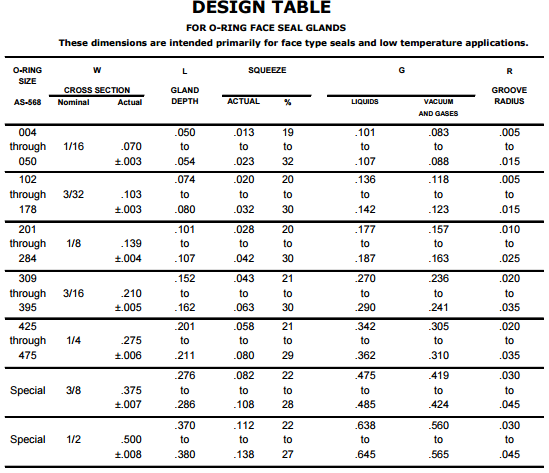
The simplest way to seal a breach in the boy of the fish will be to caulk it with an epoxy. This may be done for openings designed to allow immovable fixtures, such as buttons and LEDs. However, this obviously is not a workable solution in regards to the servo to fin interface or allowing access to the fish’s interior. To design in these features the simplest solution is likely the use of O rings and/or gaskets. O rings and gaskets are a time tested and well documented method of waterproofing. In order for these to be effective, several design considerations have to be taken into account. Thankfully plenty of information on proper gland design is readily available. One such source, for the type of face sealed, static O ring, likely to be used in the robotic fish, is shown in the Table 5 .
2.5 Robotic Fish Movement
Before it has been decided how the product will be designed, it is essential to know how the robot is going to move. Due to its purpose as a product for children to learn about programming, the fish must have simple movements. Therefore, there is not going to be centre in, up or down movements but only the movements of turning to the left or to the right, keeping at the same depth at all times.
2.5.1 Real Fish Movement
Studying the physiognomy of fishes, the research concluded that fins are the main organs that allows motion of the fish. Fins are composed bony spines protruding from the body. They are located in different places along the fish's serve for different purposes that are namely, moving forward, turning or keeping an upright position.
The most general type of fins are:
- Dorsal fin: located in the back to protect the fish against rolling.
- Caudal fin: This is the tail fin and its purpose is to propulse the fish. This will depend on the shape as there are different tails or caudal fins, but the most common is the homocercal tail.
- Anal fin: This is located on the ventral surface behind the anus. This fin stabilises the fish while swimming.
- Pectoral fins: Located in either side of the fish's body. It serves to create the dynamic lifting force and to maintain the depth.
- Pelvic or Ventral fins: These are located ventrally below the pectoral fins. They allow the fish to go up or down.
2.5.2 Other Robotic Fishes
As an example other robots fish were examined to see different forms of movement. In the following Table 6 the different models can be seen.


2.6 Controller boards
In the market of electronic boards there are countless different models depending on their characteristics as it can be their size. Here are some different models that are available on the market Table 7
| Controller board | SIZE | WEIGHT (g) | COST (€) | MICROCONTROLLER | USER I/O INPUTS | ANALOG INPUTS | PWM OUTPUTS | MINIMUM OPERATING VOLTAGE (V) | MAXIMUM OPERATING VOLTAGE (V) | RAM SIZE [b] |
|---|---|---|---|---|---|---|---|---|---|---|
ARDUINO UNO R3  | 2.95“ x 2.1” | 28 | 26 | ATmega328P | 20 | 6 | 6 | 7 | 12 | 2048 |
ARDUINO LEONARDO  | 2.88“ x 2.1” | 20 | 22 | ATmega32U4 | 23 | 12 | 7 | 7 | 12 | 2560 |
ARDUINO MICRO  | 1.9“ x 0.7” | 7 | 22 | ATmega32U4 | 24 | 12 | 7 | 7 | 12 | 2500 |
ARDUINO Nano V3  | 0.73“ x 1.7” | 5 | 23.37 | ATmel ATmega 328 | 14 | 8 | 6 | 7 | 12 | 2048 |
TEENSY 3.0  | 1.4“ x 0.7” | 5 | 16.90 | MK20DX128VLH5 | 34 | 14 | 10 | 3.3 | 3.3 | 1600 |
TEENSY 3.1  | 1.4“ x 0.7” | 20 | 17.60 | MK20DX256VLH7 | 34 | 21 | 12 | 3.3 | 5 | 6400 |
TEENSY 3.2  | 1.4“ x 0.7” | 20 | 17.60 | MK20DX256VLH7 | 34 | 21 | 12 | 3.3 | 5 | 6400 |
2.7 Robots
2.7.0.1 Educational Robots
Although the product is a robot, it is also an educational toy. Samples of other robot toys available in the market are shown to compare the features offered with different prices in the Table 8.
| Robot | Descprition | Price [$] |
|---|---|---|
Sphero 2.0. [19]  | Capability of rolling at speeds of up to 7 feet per second Works with iOS 4.0+ or Android devices with operating system 2.2+ Possibility of downloading free SPRK lessons and learn the basics of programming | 99.99 |
mBot Robot Kit [20]  | Based on Arduino open source platform Easy to assemble within 10mins Based on Scratch 2.0 and Arduino IDE Support wireless connection via Bluetooth | 74.99 |
Ozobot  | Getting experience through creative drawing Sensors can even identify the colors and stick to one | 49.99 |
WowWee MiP Robotic Companion  | MiP multifunctional and autonomous robot Perched atop unique dual wheels Gesturesense technology for hand motion controls Includes app to drive, dance, battle, balance Requires a BLE 4.0 (Bluetooth Low Energy) connection | 99.99 |
Pleo rb  | Modelled Camarasaurus dinosaur autonomous robot Thinks and acts independently, just like a real animal Able to hear, to see, to sense touch, and to detect objects Good sense of orientation and motions | 469.00 |
2.8 Conclusion
To conclude, it was necessary to gather information on state of the art products and to expand previous learned knowledge. This lead to successfully designing and creating the didactic robotic fish. During research it was established that the most suitable target market will be children between the ages of five and ten years old due to the educational purposes of programming, robotics and the appeal of this toy to the younger generation. Throughout this section of the report comparisons of several different robots and products were made to draw conclusions for the production of the robotic fish. As a group it was decided that the best method was to build a robot that had fairly simple movement and programming to prevent over complicating things for the young children that will be using this product. It was also essential that the materials, parts and components that the group had chosen were within the budget provided at the beginning of the project allocation, this was achieved with in depth analysis of the best available options in the market and by studying previous, similar products on the market.
In the next area of the report, the topic that will be discussed is the project management of the project. This chapter explores details of the requirements of the project manager and to observe how the work must be undertaken.
3. Project Management
3.1 Scope
This project’s main task is to develop and build a Didactic Robotic Fish Kit. When starting any project, it is important to define the main targets and scope of activities.
Targets
- create user-controlled robotic fish suitable for children in age 5-10,
- use waterproofing materials which are safe for users,
- choose or create a programming language which is simple to use for children in the previously defined age range,
- create the fish in an inexpensive and open source manner.
The determination of the specific targets outlined above will help with defining what tasks will be needed to complete the project. This will allow the team to pursue their goal with reduced interference. Work breakdown structure is presented below on Figure 1.

3.2 Time
Time management is a very important concept in the accomplishment of a project. In this case, a Gantt Chart has proven useful because it is a trusty tool in planning how long project tasks should take. It also helps to sequence the events by laying them out in the order in which the tasks need to be completed. Gantt Chart is presented below on Figure 2.

Deadlines were attached to specific tasks based on the work plan, which was provided by the project supervisors. List of tasks is presented below in Table 9.
| Deliverables | Deadline |
|---|---|
| System Diagrams & Structural Drafts | 2016-03-14 |
| System Schematics & Structural Drawings | 2016-03-29 |
| List of Materials (what & quantity) | 2016-04-04 |
| List of Materials (local providers & price - including VAT and transportation) | 2016-04-11 |
| Upload the Interim Report and Presentation to the wiki. | 2016-04-16 |
| Interim Presentation, Discussion and Peer, Teacher and Supervisor Feedbacks | 2016-04-21 |
| Upload refined Interim Report (based on Teacher & Supervisor Feedbacks) | 2016-04-29 |
| Upload the Functional Tests' Results to the wiki | 2016-05-30 |
| Upload the Final Report, Presentation, Video, Paper, Poster and Manual | 2016-06-11 |
| Final Presentation, Individual Discussion and Assessment | 2016-06-16 |
| Update the wiki with all correction suggestions; hand in a CD with the corrected deliverables (source + PDF) together with all code produced to the EPS coordinator;hand in one printed exemplar of the corrected report to the EPS coordinator | 2016-06-21 |
| Hand in the prototype and user manual to the client; receive the EPS@ISEP certificate | 2016-06-23 |
3.3 Cost
Cost management is the planning of project’s budget. For this project, man hours are being considered as part of the budget. Therefore, the entire 50 € budget is allocated to materials cost. For materials ordered on-line, the shipping cost also should be considered. Staying within budget is a demanding task because the goals of producing the highest quality prototype and finding low cost materials must be balanced. List of material is presented below in Table 10.
| Material | Amount | Price (€) | Final Price (€) |
|---|---|---|---|
| Arduino nano board | 1 | 12.90 | 12.90 |
| DF15RMG Servo | 1 | 29.80 | 29.80 |
| LED (red, orange, green) | 3 | 0.25 | 0.75 |
| LED RGB | 2 | 1.00 | 2.00 |
| Resistor 330 Ω | 10 | 0.05 | 0.50 |
| Battery Charger | 1 | 10.70 | 10.70 |
| Battery 7.4 V 900 mAh | 1 | 11.95 | 11.95 |
| Reed switch | 1 | 1.10 | 1.10 |
In the Table 11 we can see the relation between the hours worked for each member and the cost of this hours for the project.
| Worker | Work (h) | Price (€/h) | Final Price (€) |
|---|---|---|---|
| Achim | 338.12 | 1.00 | 338.12 |
| Álvaro | 299.12 | 1.00 | 299.12 |
| Justyna | 290.12 | 1.00 | 290.12 |
| Martin | 275.12 | 1.00 | 275.12 |
| Terry | 339.62 | 1.00 | 339.62 |
3.4 Quality
Quality is significant for every product and brand. It is an essential consideration for companies because success is dependent on it. Customers can afford to buy only those products which meet their needs. It is expected that a company has to convince consumers to purchase product. What is more, the main target of a company should be to care about product’s quality and customers’ gratification. Quality in this project is extra important for one reason, the Didactic Robotic fish is intended for children. Therefore, materials have to be robust enough to handle potential misuse. In addition, components must be waterproofed because robot will be expected to operate in and under water. Robot is intended to be used as a teaching tool. These are the reasons unique to this project why Team Three will be held responsible to produce a high quality product. This robotic fish is meant to get young children excited about programming, making a high quality fish essential. A low quality product could potentially serve to frustrate children, turning them off of programming entirely.
3.5 People
Each member of the team studies a different subject matter. This has led to different knowledge sets, previous experiences, and abilities. Diverse backgrounds combined with a common commitment have come together well in creating the Didactic Robotic Fish Kit. It is a demanding, rewarding, and time consuming mission so individual tasks have been divided between team members. This division of labor ensures the best usage of time and that each team member is working in their areas of interest and expertise. Table 12 shows the participation by various roles in completing tasks or deliverables for a project.

3.6 Communications
Since project tasks are divided between team members, good communication is crucial to ensure everyone remains up-to-date with project developments. When not in the same room, team members communicate through the internet and phone applications. It is also important though that the team has regular face-to-face meetings, in which they discuss project developments and next steps. These meetings are used for open discussions about advantages and disadvantages of particular solutions. When not in direct contact, members utilize Facebook, email, Google Drive, and group messaging applications like WhatsApp. These allow team members to stay in constant contact in order to provide updates, make group decisions, and exchange files any time, any place. Communication is not only important between group members, but it is also essential to maintain a good dialogue between the supervisors and team. Every Thursday the project supervisors organize a meeting where the team may discuss their project and ask any pertinent questions. The supervisors will answer questions, to the best of their ability, and try to improve upon presented ideas, steering students in the best direction.
3.7 Risk
Risk management is a prediction of situations which can impact and break down project. In order to avoid unnecessary problems members should be prepared for any eventuality and try resolve it. List of risk and its description, effect, response is presented below in Table 13.
| ID | Description | Cause | Effect | Trigger | Response | Owner | Last review |
|---|---|---|---|---|---|---|---|
| 1 | Problems with communication between the Arduino software and hardware. | 1.Board doesn't work correctly. 2. Cables are broken. 3. Mistakes in wiring. | 1. Replace the board. 2. Check and replace the cables. 3. Reconceive the concept. [TIME,COST] | Check the board early enough. | 1-2 If board and cables don’t work it must be accepted and replace them. 3. Mitigate it by checking it frequently. [ACCEPT, MITIGATE] | Achim, Justyna | 2016-05-26 |
| 2 | Waterproofing problems | Fish is not waterproof and water gets inside. | Conduct tests without any electrical components inside. [TIME,COST,SCOPE] | Check waterproofness of every component. | Avoid by testing a waterproofness of the fish without any electrical components. [AVOID] | Terry, Martin | 2016-05-26 |
| 3 | 3D printer will not work as expected. | Printings are in a bad quality. | We have to print every component again. [TIME,SCOPE] | Try to print one part of model and check it. The next solution is to change 3D printer. | Transfer because it is responsibility of ISEP. [TRANSFER] | Terry, Alvaro | 2016-05-02 |
| 4 | Illness of team members | Don’t enough rest. | If it is possible, the absent member do task at home. Otherwise another member of the group can divide the absent persons task. [TIME,COST,SCOPE] | Care about your health. | Don’t go out at night. Go to bed early. [ACCEPT] | All | 2016-06-23 |
| 5 | Damaging electrical components or materials. | Improper use. | Replace electrical components [TIME,COST] | Functional test | Buying a new components. [ACCEPT] | Martin | 2016-06-23 |
3.8 Procurement
Procurement management can aid with purchase goods and services from external suppliers. It is crucial to pay attention to quality and costs of goods, including costs related to postage. There are many potential suppliers in the market. Materials could come from any local shop or website. For this project we focus on following criteria when choosing a supplier:
- quality,
- time of potential postage,
- price,
- service,
- reliability,
- location.
3.9 Stakeholders management
Stakeholders management is relevant issue because thanks of it team is able to pinpoint people who have direct influence on the project. It includes also interest and power. Table 14 below shows stakeholders who have influence on the project.
| Who | Role | Expectations | Power | Influence |
|---|---|---|---|---|
| Team members | Creators of the project | Dedicated and successful. Complete scheduled tasks. Participation on weekly meeting. | High | High |
| Benedita Malheiro | Supervisor | Supervise an interesting project. | High | High |
| Manuel Silva | Team supervisor | |||
| Pedro Guedes | Team supervisor | |||
| Lecturers | Teacher | Expect taking part in classes and gain knowledge which is necessary to do WIKI | Low | Medium |
| ISEP | Sponsor | Deliver a project | High | Low |
| Suppliers | Provider | Provider of our components | Low | Low |
3.10 Conclusion
To conclude this section of the report, the main objective was to organise the project planning in a clear and efficient manner. This was vital to the project as it allowed a positive working environment and each team member could clearly identify time limit and the exact tasks that they had been provided. To begin this process, the team took part in constructing a Gantt chart that highlighted the time limits and specific tasks for individual members of the group and this helped to maintain a positive environment. It also allowed visible identification of certain areas that would require more time and effort than possible smaller and less time consuming areas. Quality control was another vital aspect of the report and had to be undertaken effectively to ensure that the product would satisfy the demands of the clients and customers.
4. Marketing Plan
4.1 Introduction
Marketing is a society process in which an individual or groups get what they want by creating, offering, unfettered exchange goods and services. The main marketing tool is the marketing mix. The most popular market concept is 4P: product, price, place, promotion. The shortest definition of marketing is to “satisfy a need and make a profit”. Marketing divides on:
- Micro Environment
In micro marketing, all the focus is on a small segment of a consumer and on them specific needs for the products which occur in the market. - Macro Environment
Macro marketing is large in scope. It more focuses on aspects that goes beyond the scales of micro marketing. It researches all of the market, not only our product’s market.
Figure 3 shows difference between Micro and Macro Environment.

4.2 Market Analysis
In this chapter we focus on hardware that will help us to present robot’s market. To present macro environment we use PESTEL. It is helpful hardware that enables us in decision making in political, economic, social, technological, legal and environmental factors. It allows us to describe the impact another field has on enterprise.
4.2.1 Macro Environment
PESTLE analysis is in effect an audit of an organisation's environmental influences with the purpose of using this information to guide strategic decision-making.

4.2.1.1 Policy/Legal
The government has a huge influence on a company’s marketing activities and they decide which goods and services should be delivered to its citizen. For instance, the government bankroll companies which will have a major impact on a companies’ organisation. Therefore, every enterprise should comply with the law and regulations of the country where they wish to market their products.
For this project, it is important that the design complies with The Toy Safety Directive 2009/48/EC [21]. The scope of the 2009 Toy Safety Directive is covered by Article 2. It provides a definition for what a toy is, and therefore determines whether a product falls under the scope of the Directive: “Any product or material designed or intended whether or not exclusively for use in play by children under 14 years of age”.
Manufacturers i.a. shall:
- ensure that the toys been designed and manufactured accordance with the requirements set out in Article. 10 and Annex II.
- keep technical documentation and EC declaration of conformity for a period of ten years
- apply procedures are in to ensure conformity of series production . should be take account of changes in design or characteristics toys and changes in the harmonized standards , by reference to which conformity toys.
- carry out a safety assessment of the toy
- make sure the toy is accompanied by instructions for safe use and safety information where appropriate
- ensure that their toys carry a type, batch, serial or model number or other allowing their identification. Information provided on the packaging or in a document accompanying the product.
- make sure the toy is accompanied by instructions for safe use and safety information where appropriate
- make sure that continuing production runs of the same toy remain in conformity
- carry out sample testing of marketed toys
4.2.1.2 Economic
In Europe the toy industry develops dynamically. Every year about 60% of toys on the market are new products. Within European Union there are some 5.000 toy companies which employ 222.000 people in the sector. The EU market currently represents 28% of worldwide traditional toys and games sales. Figure 5 shows sales of traditional games and toys by country.

The most popular categories of traditional toys and games in EU markets are games and puzzles and infant and pre-school toys. Construction toys, dolls and accessories, and outdoor and sports toys follow top selling categories.
Traditional toys and games are dominated by brands such as Mattel Inc, LEGO Group, Hasbro Inc. Together their combined market share in the EU is almost 27%. The five leading toy markets in the EU – France, Germany, Italy, Spain and Great Britain [22].
4.2.1.3 Social
Nowadays, people can only afford to buy products which meet their needs. In the market of robots, the most popular are household robots which make our life easier. This project presents a demanding task because there are already several robots for children on the market. Parents try to find something what develop their kid’s skills and that will be respectively at a low-cost. therefore, bubbles is an opportunity to teach kids more about programming.
4.2.1.4 Technological
Today everyone must move with the times and carefully follow innovation to stay up to date with technology. Industrial development is very fast thereby costumers/consumers have greater demands. For this project, specific concerns include technological details like breadboard, sensors and the battery.
4.2.1.5 Environmental
Nowadays environmental concerns are a crucial aspect because creators are expected to use components which can be recycled and will not be dangerous for the environment. These concerns have become progressively more important due to the increasing scarcity of raw materials, pollution targets, ethical and sustainable concerns facing companies, carbon footprint targets set by governments (this is a good example were one factor could be classes as political and environmental at the same time). These are just some of the issues marketers are facing within the environmental realm. More and more consumers are demanding that the products they buy are sourced ethically, and if possible from a sustainable source. The components of Bubbles which are easily recycled are the 9 V battery and polylactic acid body.
4.2.2 Micro Environment
4.2.2.1 Suppliers
The choice of suppliers is very significant concern. The team tries to choose the most reliable supplier who will deliver components in the shortest time and the lowest-cost of the package. It is also important to be sure that components will be delivered on time because of project deadlines. So it has been determined that Botnroll, Mouser Electronics, and Ptrobotics are reliable suppliers.
4.2.2.2 Customers
Customers play the main role in the creation of a company, brands. They are a major factor which has a big influence in developing a company. Thanks to the role of the customers, companies have an opportunity to relieve its position in the market. As regards to this project, the main customers will be:
- Buyers (parents, fan of toy robots)
When considering buying a didactic children’s toy, there are two main aspects a parent may consider. First is a price, which plays a crucial role in choice of this robot. Second is the usefulness in teaching new things their children.
- Companies like:
- MATTEL - is an American toy manufacturing company. They produce toys like Fisher-Price, Barbie dolls, Monster high dolls, Winx Club dolls, Hot Wheels, Hot Birds and Matchbox toys, Masters of the Universe, American girls dolls, board games, and WWE Toys.
- HASBRO - is an American multinational toy and board game company. It is one of the largest toy makers in the world.
4.2.2.3 Competitors
Within a few years, competition within the robotics and automation industries will increase. While designing, Team Three has to be aware that every person who has proper components, money, and knowledge could create similar robots. The main agents to combat this are quality and advertisement. Therefore, the team has prepared the logo and a flyer. On the grounds of earlier gained knowledge and experience a user-friendly, low-cost robot will be created. The biggest competitors in the field are:
- Soft Robotic Fish
- Tamiya ROBO
- Robot Fish by ITN source
- Team 1 - 2014 - Biologically Inspired Swimming Robot
4.3 SWOT Analysis
SWOT analysis involves segregation of the available information about four categories of strategic factors:
- S ( Strengths )element that is an asset, advantage, the advantage of the analysed object
- W ( Weaknesses ) everything that is a weakness, a barrier defect analysed object
- O ( Opportunities )aspects that make for the analysis of a chance of positive change
- T ( Threats ) everything that makes for the analysis of a risk of unfavourable changes
Figure 6 shows our SWOT analysis.

4.4 Strategic Objectives
This section concerns the long-term success of Bubbles within the next 5 years. To set the objectives team members used a system called, SMART. SMART stands for: Specific, Measurable, Achievable, Realistic, Time-bound. Thanks to this system a realistic approach to a particular task can be reached. It is:
- ameliorate the model
- to find permanent supplier who deliver all components
- the reduction of production costs in order to increase a profit
- the improvements in relation with clients, come up with their expectation
- new investments
4.5 Segmentation
Market segmentation is a marketing strategy where the task is to determine customers who will purchase a product. Segmentation involves dividing the population into smaller parts called segments, which differ in terms of customers’ needs for the product, the method of purchase, and other selection criteria. After segmentation, the company must choose a segment in which it wants to sell their goods. The main purpose of segmentation is to analyse the structure of the market and the needs of the customers who make up the market. homogeneous markets can be distinguished in terms of structure and varied needs. To segment in the appropriate way, we used following division:
4.5.1 Demographical segmentation
Bubbles is intended for boys and girls age 5-10. Therefore, the main clients will be fun of technology news, parents, and also grandparents. Running a business is easier if law and regulations of particular country is known by team members. After market research and learning particular directives concerning toys developed in Germany and Spain, an avenue for market expansion was planned. If this company can make a profit, the next markets will be France, Italy and Great Britain. Table 15 below shows the estimated percentage division of the population in 2020 to better understand the market.
| Country | Population | Children at age 5-10 (%) | Adults 20-100 (%) |
|---|---|---|---|
| Germany | 80 392 000 | male: 2.2 female: 2.1 | male: 40 female: 42.1 |
| Spain | 46 193 000 | male: 2.4 female: 2.3 | male: 39.2 female: 41.5 |
| France | 65 720 000 | male: 3.1 female: 2.9 | male: 36.5 female: 39.5 |
| Italy | 59 741 000 | male: 2.2 female: 2.1 | male: 39.5 female: 42.4 |
| Great Britain | 66 700 000 | male: 3.1 female: 3.0 | male: 37.2 female: 39.1 |
4.5.2 Geographic segmentation
It is crucial to determine which countries that Bubbles should be launched in. Another important concern is minding status and region. The main task is to find market where there will be demand for product. Awareness that product will be better received in some countries than others, is an important because consideration. Noting that the marketability of the product is connected with social status, lifestyle, and interest in technology news, which varies by country and region. Bubbles is a robot fish, therefore and important concern it to find places and regions where people have access to swimming pools and/ or bodies of water where they can use the product.
4.5.3 Behavioural segmentation
Sales of toy definitely increase around Christmas time. In December and January, purchases in toy shops raise about 20%. For every company, this is the best occasion to improve their financial situation. However, Bubbles is a robot that people can use in amusement park where is access to swimming pool. So that demand for this robot will also increase in the spring and summer.
4.5.4 Psychographic segmentation
The main target reach customers who have the similar demands with regard to our product. Fans of technical news, parents, and grandparents will be preeminent clients. The first type of client demands new improvements and technological solutions. The second type of client require a robust toy, which should handle potential misuse and get young children excited about programming.
4.6 Strategy/Positioning
Positioning of company is a process that is aimed at creating positive associations. It focuses on how customers perceive a company and what positive qualities distinguish it from the competition. Skilful positioning leads to the formation of well-known brand with loyal customers. There are several options for positioning a company:
- striving to strengthen its position in the market, where the company is the leader;
- increasing or decreasing the diversity of product offerings, imitative action. This method of positioning involves the use of a good position existing products;
- the introduction of a product that does not exist yet on the market using the existing gap in the segment.
In this case, focusing on the second point is relevant in order to aid promotion and to increase the offer for additional services. Accordingly, offering different options like choice of fish colour and adding some accessories or signatures that may appeal to clients.
4.7 Adapted Marketing-Mix
4.7.1 Product
Bubbles will be built with Polylactic acid, which is robust enough to handle potential misuse. This is crucial because the product is intended for children in age range 5 – 10. The products programming language should be simple enough to use for children in the previously defined age range by means of ArduBlock. Connecting the robot to a computer and sending commands will enable the user to control its movement. The another thing is the shape which will be defined by the device’s of use. Furthermore, the robot is being created to play the role of a toy.
4.7.2 Price
To determine the final price, the important thing is to compare prices from competitors. Thanks to this, company which want to develop itself in the market can be more appealing for customer because of lower price simultaneously offer a good quality product. In the case of when the product requires mass production, costs include direct and indirect costs of production. It means labour, raw materials, utilities, office equipment rental, promotion, delivery. The most crucial aspect is also profit and revenue. To buy the components will cost 67 euros and counted earlier mentioned costs team three suppose that product will be cost about 200 – 300 €.
4.7.3 Promotion
Nowadays there are many devices to promote a product. Promotion is of utmost importance for and infant company because it will determine the future of the enterprise and the brand. To promote Bubbles, a website will be used as well as social media (Facebook). To increase communication with existing customers/consumers email may be used to offer them discounts. In terms of no digital advisement, flyers and billboards will be used. To plug the product, it can also advertised for on other websites. Furthermore, promotion within schools and shopping centres is meaningful as well.
4.7.4 Place
In this part the focus is the distribution channels for Bubbles Distribution is the process in which embracive decisions regarding the manufacturer and a final recipient. Distribution channels set of all entities (cells) through which one or more streams, associated with the operation of my marketing, flow. These include streams of the physical product flow, payment for goods. Factors influencing the choice of distribution channels include the following:
- Characteristics of the market segment
- Product features
- Characteristics of the company
- Structure of distribution
- Characteristics of other enterprises
Team three decided that for the beginning, the product will be sold in toy shops and also in supermarkets. Over time, once Bubbles will be more recognised, the team will try to sign exchange contract with big companies.
4.8 Budget
Marketing budget is a pool of funds set aside by a company for more dynamic selling of their products in the market. Marketing expenses, as well as most of the costs incurred represent a certain investment, causing a certain effect. The immediate goal of creating and spending marketing budgets may be: increase brand awareness among consumers and/or trading partners; increasing the purchase of products, resulting in increased turnover and market shares of the manufacturer; prevent similar actions of competitors to protect its sales or market share. Marketing budget includes elements related to the preparation of a new product to market, actions directed towards communication with customers and trading partners, and market research.
Our budget:
- Advertisement
- leaflet – 200 €
- websites - 1000 €
- posters - 250 €
- Facebook – 100 €
- trade fairs – 600 €
| Fair trade | City and country | Date |
|---|---|---|
| Suisse Toy | Bern, Switzerland | 06 Oct – 09 Oct, 2016 |
| Toyzeria | Istanbul, Turkey | 27 Oct - 30 Oct, 2016 |
| Interpädagogica | Vienna, Austria | 10 Nov - 12 Nov, 2016 |
| G! Come Giocare | Milan, Italy | 18 Nov - 20 Nov, 2016 |
- Other expenses
- business trip (airline ticket, accommodation, maintenance) - 1200 €
- Bern, Switzerland
- Istanbul, Turkey
- Vienna, Austria
- Milan, Italy
- courses for employee – 400 €
4.9 Strategy Control
The purpose of the control of the plan is to ensure that sales, profits and other objectives contained therein is achieved by the company. The company also needs control of profitability by product, geographic areas served segments or distribution channels. It helps decide whether any products or marketing operations should be extended, reduced or eliminated.
4.10 Conclusion
To assess the possibility of the development of our product on the market, we examined the macro and micro marketing. In order for micro marketing to be successful, team members used the method of PESTEL analysis. Bubbles will be developed in countries located within the European Union. As a result of this, the team has become familiar with the laws and regulations that apply to toys. In addition, we selected the 5 countries in which the product will be able to grow over the next 5 years, these are: Germany, Spain, France , Italy and Great Britain. With regards to macro marketing a SWOT analysis was created, to help identify the strengths, weaknesses, future opportunities and also any potential threats. The team carefully researched different suppliers to find out the best company to use for price and quality to provide the best possible components. The team has also established product promotion method. There will be a flyer , advertising and the creation of a website all contributing to boosting promotion of Bubbles. Another type of promotion shows where we will be able to familiarize potential customers with the product. To summarise, the product is designed for children aged 5 to 10 years, therefore it must be of very high quality and be easy to use.
5. Eco-efficiency Measures for Sustainability
5.1 Introduction
The main purpose of sustainable development is to provide solutions for the preservation of natural resources. Its target is to spare water and to reduces humans' negative impact on the environment and human health. In general, there are three different subsections of Sustainability [23]:
- Economic sustainability is concerned with creating a healthy and stable business.
- Social sustainability is concerned with creating a fair and decent work environment.
- Environmental sustainability is concerned with using energy and resources efficiently and sustainably, without producing trash..
In this project, sustainability is an important aspect regarding reusability, environment friendly materials, and eco friendly transportation.
5.2 Environmental
The purpose of environmental sustainability is to protect the natural environment and its resources, preserving the human habitat. The interest in this topic has been on the rise in the last few decades and continues to be increase. The necessity of this topic has already reached a high awareness levels. As a consequence, many companies are trying to change their productions to be more environmental friendly. For this didactic fish, it is important to take the aspects of environmental sustainability into consideration when selecting materials and production techniques [24].
To create the body of the fish, team three is using PLA (polylactic acid). PLA is a plastic made of renewable resources. Commonly, the raw materials used to create it plant products like cornstarch or sugar cane because of this, the material is biodegradable and can disposed without having any long-time negative impact on the environment.
The product will be sourced using only local suppliers. This eliminates carbon footprint created by long distance transportation.
For the selection of the electrical components, it is important to use components with a low energy consumption. This aspect affects the products electric consumption and the longevity of its batteries. To keep a product consumer-friendly, regular batteries over the counter batteries will supply its power. Therefore, it is important that rechargeable batteries are used. These batteries are more expensive but may be recharged the up to 2000 times, meaning they are more eco-friendly and will save a user money over time. Nickel–metal hydride batteries are the preferred option because of their high number of recharge cycles and their high capacity compared to other batteries [25].
Bubbles design will allow for the easy to replacement of broken components. Consequently, the consumers will not have to buy a new product if any part of the toy should break. They will only have to replace the broken component. Therefore, the product will not create as much trash, which protects the environment.
5.3 Economical
The purpose of economical sustainability is to provide strategies which optimize the use of existing resources. This is necessary to produce efficiently and profitably over a long period of time [26].
An important aspect of an efficient economy is the contribution of the local economy. For this reason this project will acquire all components from local providers in Portugal. Through this, the economy of the country is supported.
By playing with the didactic robotic fish, kids are making their first steps in a programming environment. By keeping Bubbles price low, children disenfranchised by similar, but more expensive, products will be able to explore the world of programming for the first time. This initial exposure can foster talent the interest in the field of programming. In today's world, where software engineering is an important ever growing field, qualified programmers are an important force in the growth of the economy.
5.4 Social
Along with economical and environmental sustainability, social sustainability is the third pillar of sustainability. However, social may be the weakest of the three pillars, largely because people cannot agree on which way is up. The general definition of social sustainability is the ability of a social system, such as a country, to function at a defined level of social well-being indefinitely [27]
Social sustainability can also be defined as the life-enhancing condition within communities, and a process within communities that can achieve that condition [28]
Based on these ideas, Bubbles has been developed with the ideals of help the society eradicate the gap between the rich and the poor, to build a society on equal terms. Horace Mann is famous for stating that, “education then, beyond all other devices of human origin, is the great equalizer of the conditions of men, the balance-wheel of the social machinery”, and it was with this in mind that Bubbles was developed. It its own small way, this project will contribute to defense human rights and push society towards more equal footing.
Bubbles is an affordably priced, manufactured toy, whereby children and their parents will be introduced into the electronic world. Children of all walks of life will be able to learn programming from their own toys. The digital world is rapidly expanding, and command of this world is arguably one of the most marketable and profitable skills you can have today. So getting children interested young and teaching them the basics of programming is one of the best things that can be done for their futures. Unfortunately the threshold price to access toys similar to Bubbles is much higher than many parents can afford. By keeping Bubbles price as low as possible, while still providing a fun a educational toy, lower income families will be able to set their children on an early path to success.
In short, with this robot fish many more children will have access to a fun and easy way of study something, which could help them to build a better future for themselves and the world.
5.5 Life Cycle Analysis
During all the development of this project Team Three took into account the life cycle of their product. One of the main targets of the project is make children realize that it is not necessary to throw out something that has stopped working or lost its usefulness. Kids should know that if an object is not functioning in a useful way, there are several options besides the trash. When confronted with a broken or obsolete item, the first question to ask is can it be fixed? With a simple tune up or a couple replaced parts, would the object be operational again? If no, it cannot be fixed, there are still several better options than a landfill. Perhaps the object can be repurposed to perform a new task, and if not almost all materials can be recycled and reused.

5.5.0.1 Raw Materials Production
As has been mentioned before, all components and materials for this project will be purchased from local suppliers. We have searched specifically for supplier in Porto that source recycled materials. Additionally the body of Bubbles will be printed in PLA plastic. PLA it is a biodegradable material, made of renewable resources.
5.5.0.2 Preliminary Production
Such us we are going to buy all the different components in Porto, we don not need to product or manufacture any electronic component. That is why the unique preliminary production that we have to do it is design the pieces of the fish and print them with a 3D printer. Therefore, the unique waste of energy it is consumed by the 3D printer.
5.5.0.3 Manufacture of end products
During this phase, construction will be performed with human labor (team members) and the machines required to assemble all the pieces of the fish, with all the electronic components connected inside. This phase is the last one in which team members will have access to the product. So it is last opportunity to perform any modification in the project. After manufacturing the product will be packaged, distributed, and finally delivered to the customer.
5.5.0.4 Use and Operation
Like the name of the project suggests, the Didactic Robotic Fish Kit is more than a simple toy for children five to ten years old. It is didactic meaning it has been developed to educate. Children using Bubbles will learn the basics of how to build and program their own robot. Upon receiving the kit, kids will need to assemble the main body and the tail prior to starting to program its motion. This step in the life of the product is as important as the manufacturing before because if the customer does not correctly follow the instructions in the provided manual, the fish will not function correctly.
5.5.0.5 End of life phase
In last phase of the cycle, Bubbles demonstrates one of the aspects that sets it apart from the competition. One of the main goals in this project is to provide a product with a long life cycle. To this end the customer will be allowed to purchase new parts to replace any damaged components, without having to buy a entire new fish. The customer simply has to buy a new component from a local supplier, and will receive a discount if returning the original, damaged component to be recycled.
5.6 Conclusion
Nowadays sustainable development is one of the most important aspects to consider in creating a product for all companies. Bubbles would not be less, so one of the objectives for which has been developed is to educate children that what it broken not need to be thrown away, but may have a second use or may be recycled for reuse. This fish robot intended as an aid for parents in educating their children in an environment that respects the environment, which supports sustainable development and raise awareness of the need to leave a better world to future generations.
6. Ethical and Deontological Concerns
6.1 Introduction
An ethical concern is a set of problems that will affect a person or an organisation. Ethics is a study of morality and the organisation must decide upon whether concerns that are affecting them are morally ‘right’ or ‘wrong'. It will also determine which principles, policies, laws or actions are intact morally justified.
Deontological concerns follow the same principles as ethical concerns as they are defined by the morality of choice by an organisation to take certain actions they feel are necessary. Thus, it is essential that both of these sectors must be evaluated before finalised decisions are made by the organisation.
With regards to the project that the team has undertaken, there are five critical points that are in relation with both ethical and deontological concerns. These categories are as follows; Engineering, Marketing, Academics, Environmental and finally liability ethics. It is pivotal for the construction of the project that each one of the topics mentioned are fully taken into consideration when making decisions.
6.2 Engineering Ethics
Engineering ethics consists of the responsibilities and rights that must to be declared by those working in engineering, and also of desirable ideals and personal commitments. This section is one of great importance due to the project focusing almost solely on engineering. This particular type of ethics is the study of decisions, policies and values that are morally desirable within both the research and practice of engineering. Once more engineering ethics involves being fair, honest, respectful and meeting the expectations of the client [29].
Safety is another critical aspect of engineering ethics to ensure that work being carried meets the standards set by health and safety regulations. Ethics are critical in stressing an engineers responsibilities but also the freedom to conduct them. The essential acts that engineers must oblige to are as follows:
Only engineers that are qualified to do so may complete tasks given to them. To ensure the safety regulations and standards are met even exceeding those expectations to provide the highest level of safety possible for the working environment. Engineers are required to carry out any assignments that have been appointed to them by their employers or customers to the utmost best of their ability.
The tasks that are provided to the engineer must be completed in an ethical, respectful, law abiding manner to prevent loss of reputation and professionalism and to honour agreements made prior to the beginning of construction. Finally, engineers must at all times when dealing with public, provide accurate and honest opinions, objectives and planning to the client. Thus, allowing the client not only to trust and respect your ideas but to enhance your own reputation.
6.3 Sales and Marketing Ethics
Ethical marketing is a process that will promote a fair, honest and responsible working place in advertisement. It follows the same ideas as all ethics and is essentially analysing different options of what is morally ‘right’ or ‘wrong’. This particular form of ethics exists to form a main set of guidelines that will enable assistance to an organisation whilst they consider new strategies or ideas. Ethical reasoning must take place within the organisation and this can only be accomplished by reviewing the six different sections that exist within Marketing ethics [30].
First and foremost it is of great importance that research must be undertaken before moving on to any other sector. Problems often arise in the following areas of marketing research:
- The relationship between the researcher and the client
- Between the researcher and the researcher subject
- Between the researcher and the marketing research history
Once business has been completed between both the company and the client the research that has been completed must be private and also secure. More importantly if this research becomes no longer necessary then it must be deleted. Customers are the most important part of any organisation and therefore interactions with the customer must be done so in an honest and respectful manner. It is crucial for the group to ensure that they receive the product that fulfils both their needs and expectations.
Pricing is vitally important in terms of sales and marketing as not only must the project team make a profit but also provide the customer with a fair price of the product that meets expectations and both parties agree to. It is essential to avoid what is deemed as ‘unethical pricing’ such as:
- Price fixing
- Price discrimination
- Variable pricing
- Creating pricing wars
- Bidding
Competition exists in any work environment with many different organisations producing similar products or working methods. Sales and marketing ethics comes into effect in order to compete in a respectful manner and to create fair competition between competitors.
Most importantly, safety is critical for the production of the project. The team has the responsibility to provide a product that is safe and provides no great risk to anyone involved. The monitoring of the manufacturing process is very important and to consider the common misconception that the majority of accidents are a result of the misuse or abuse of the product.
The final section that exists within Marketing ethics is once the product has been successfully constructed, it is then possible to move onto the promotion stage. It is key that during the promotion of the product that it will be done so in a professional manner without the introduction of any false promises or even deceptive marketing where customers could receive misleading information about their potential purchase.
6.4 Academic Ethics
Academic ethics or academic integrity is essential for educational purposes and to allow fairness in educational practices. It is fundamentally an ethical code that exists in the area of academic study, actively working to maintain academic standards within a school or higher education facility and to avoid the potential of plagiarism and even cheating.
To define the act of plagiarism, it exists in the case where a person has intentionally or unintentionally copied exactly from someone else work or where they have used words from another persons work without the use of appropriate references. Thus, in our group we have worked together to ensure the use of proper quotations to avoid an accusations of plagiarism.
On the other hand cheating is another heading that falls under the academic ethics code. The attempt from an individual or a group that presents work that is not their own or aided another individual by conferring answers when they have been informed that the work is to be performed on individually. Once more the team had to make sure that any ideas that were referenced for the project, were done so correctly and appropriately, ensuring it is individual work and to avoid any situation of being accused of cheating. It is important that the work produced is genuine and as original as it can possibly be, this making the product different from other competitors and allowing it to stand out in the market [31].
6.5 Environmental Ethics
Environmental ethics is a is a study of how ethics play a part in the relationship between human beings and the environment. Within environmental philosophy, environmental ethics is a form of ethics that will examine the ethical relationship between humans and the natural environment. This form of ethics highlights the responsibilities of humans on the natural environment as humans are part of that environment and therefore should be protecting, not destroying it. Environmental ethics also takes into consideration a significant amount of regulations that include, law economics geography, sociology, theology and ecology.
It is vitally important that humans respect and honour the belief of the environmental ethics code that firmly believes that humans, plants and animals are both part of society. At present, the world is facing many problems that are affecting the natural environment due to incorrect disposal of harmful items and an increase in CO2 emissions. These factors have lead to the creation of several issues that are harming the earth, these include global warming, global climate change, pollution and the degrading of resources. Environmental ethics comes into effect to ensure that we as humans are helping to save the world and keep the environment protected [32].
Due to a significant and continuous rise in the Earth's population and ignorance towards the environment, there has been a rise of many environmental issues that are deeply concerning, these include, overpopulation, waste, the formation of acid rain, climate change, reduction in the ozone layer, urban sprawl and finally global warming.
This is why it is vital for the group to continue to follow the codes of environmental ethics and to do perform our duty by carefully selecting the best available materials that are not a danger to the natural world. It can be as simple and ensuring that everything possible has been done to attempt to reuse materials, preventing the need for the creation of new components. The design of the robotic fish will be done so with regard to the environment are where possible a design will be created that can be environmentally friendly.
6.6 Liability
The final section of ethics is called liability ethics. A legal liability is one in which a person is responsible for their own actions and involves a person breaking the law whilst taking part in certain work. As a group it is essential to acknowledge the main responsibilities towards the supervisors and to the customers. Therefore, in the unfortunate case of any error taking place whether it was intentional or unintentional we must accept the consequences of what has taken place.
Furthermore, the group must also be aware of potential complaints and dealings with unhappy customers. There is the potential to receive a variety of complaints from the general public and must ensure that reasonable complaints must be dealt with efficiently and respectfully. However it is possible to prevent an unfortunate situation like this occurring and that is by defining the terms of warranty clearly and any other aspects that the customer should be made aware of.
The finished product must also come with appropriate safety measures that will be listed within the users manual to prevent the risk of health and safety and to avoid a backlash from dissatisfied customers. This point is even more pivotal to the group as the target market has been set for young children between the ages of five and ten years old and there is the potential for a young child to swallow small pieces.
With regard to the groups particular project, it is key to respect and understand the concepts of both the liability measures and follow them correctly. We must also ensure that the health, safety and equipment that is used is at no risk to any of the team members, supervisors or the clients.
In order to complete the creation of the didactic robotic fish it is essential that we comply with the following EU directives:
- Machine Safety Directive(2006/42/CE2006-056-17)
- Electromagnetic Compatibility Directive(2004/108/EC2004-12-15)
- Electrical Electronic Equipment Directive(2002/95/EC2003-01-27[33]
6.7 Conclusion
To conclude, the main ethical and deontological concerns were examined and the group now has a greater and wider understanding of these concerns and how they should be addressed. The team looks to be ethical in every way possible throughout the continuing construction of the robotic fish to ensure the product meets the demands that were initially set. The team is one of a broad range of backgrounds and each one of the ethical sections applies to each person whether they are from a marketing or engineering background.
7. Project Development
7.1 Introduction
Bubbles is a didactic robotic fish that will be created as an educational learning tool aimed at targeting young children between the ages of five and ten years old. The team found inspiration in the development of the product by researching existing products and similar ideas before coming up with our own unique design. The project development stage will highlight team progress, focusing mainly on the development of a prototype. Throughout this stage, there is more of a focus on the engineering side of the project with different structural drawings, a 2D and 3D model, components list and finally a electronic schematic diagram to show how the fish will be electronically connected.
7.2 Architecture
7.2.1 Electronic Architecture
After researching available hardware and completing preliminary design consideration, this simple schematic outlining the projects hardware was compiled, shown in Figure 7

7.2.1.1 Complete Electronic Schematics
As shown in Figure 8, there is an Arduino Nano used to operate all components. The 14 digital I/O and one Analog Input of the Arduino are used to drive the servo motors, to power the LED and readout the button. To power the three servo motors, a voltage regulator 7805 is used. This regulator has a current capability of 1.5 A. Since every servo has a maximum working current of 500 mA [1] , the voltage transformer is able to power all of the servos. The digital Outputs D2-D4 of the Arduino Nano are used to control the servos. The three single colour LED and the two RGB LED are connected to the digital Outputs D5-D12. To limit the current in the LED to a safe value, every LED is serial connected to a 330 Ω resistor. In addition, the button is also serial connect to an 330 Ω resistor to protect the analog Input A1. In case of a pressed button 5 V are directly connected to the analog Input. The resistor has to function to protect the Arduino board of this voltage.

7.2.2 Modelling the Fish Body
The physical body of the fish has gone through many conceptual design changes. the realization of the design began with simple 2D sketches and evolved into increasingly complicated 3D models. This evolution and the though process behind the design is outlined in this section. After completing several hand sketches, Team Three created their first CAD design which may be seen in figure 9.

This 2D model above was created in AutoCAD and shows the original concept for Bubbles. Tough the design has since undergone a number a critical changes, the essence of the design remains the same as shown in figure 3, with one servo driving propulsion and two servos controlling pectoral fins. The team thought it would be important to give the final product more than the required one degree of freedom. This would provide children with a greater range of elements to program, and more fun toy. Hence the inclusion of the models pectoral fins. As and additional bonus, these fins will provide Bubbles with increased stability in the water.
After completing the first 2D design, a simple 3D structure was completed in order to conceptualise the shape of Bubbles body. This model is shown in figure 10 below.

The model in figure 10 was created in AutoCAD and shows the general shape that the final product will take.
7.2.2.1 Advanced 3D Modeling
The body of Bubbles will be created with a 3D printer. These printers read STL files which are typically created in a 3D modelling environment. To create these 3D models, team three utilized Siemens NX10. Several design iterations were created in NX before producing the model shown in Figure 11 below.


After completing and analysing the first model, team three decided on several important structural changes. First it was determined that a linkage should be created between the driving servo and the rear fin in order to reduce stress on the servo. It was also determined that the body of the fish should be re designed to allow sufficient room for batteries bellow all the servos and that additional support should be added to the fish's side walls. Finally, it was agreed that the fishes solid rear fin should be replaced with a two part fin. The new rear fin should consist of a solid plastic piece attached to the servo and a semi-flexible rear portion that will provide the bulk of the propulsion. With theses changes into a new design, the model shown in figure 12 was created.


The second complete 3D model incorporated the necessary design changes identified during previous design phases. As can be seen in figure 12, the orange block, which represents the battery, is located at the lowest possible point. As the battery is the heaviest component, this drastically lowers the design's center of gravity, making it more stable in the water. The body's walls have been slightly thickened and supports added in order to increase structural integrity. In this model, the tail has been split into two distinct pieces and is driven via a linkage, rather than directly by the servo. However in this design, there was insufficient space for any additional ballast, which was presumed to be needed. This led to the development of the final design, shown in figure 13.


This final design, made several improvements on its predecessors. The largest modification was removing the lateral fins, this reduces cost and eliminates the need to waterproof servos. Additional design changes include, increased space for ballast and adding an additional attachment point for the tail. This change divides the driving moment and places half at either end of the tail. The additional cylinder on top of the fish, is designed to house a magnet. This magnet will serve to control a reed switch, determining when the program will run.
7.3 Software Development
7.3.1 Introduction
Based on the research in the State of the Art section, the decision was made to create a block-based programming language on the open source-basis of ArduBlock. This chapter includes the import of the ArduBlock source files to compile a runnable version of ArduBlock. Further it is described which custom functions the software has to provide and how these functions were included into the source code.
7.3.2 Setup ArduBlock in Eclipse
To develop the ArduBlock source code, it is necessary to import ArduBlock and OpenBlock to Eclipse. Both source codes are provided by David Li on GitHub. ArduBlock and OpenBlock are compiled by Maven, a build automation tool used primarily for Java projects. To import OpenBlock, the following commands have to be executed.
mvn clean package
mvn exec:java -Dexec.mainClass="edu.mit.blocks.controller.WorkspaceController" -Dexec.args="support/lang_def.xml"
Compared to OpenBlock the setup of ArduBlock is more complex and requires more steps. The following commands have to be executed to import ArduBlock to Eclipse.
cd ardublock
mvn validate
mvn clean
mvn eclipse:clean
mvn eclipse:eclipse
After these steps ArduBlock and OpenBlock can be imported to Eclipse by using the import Dialog File → Import → General → Existing Projects into Workspace ArduBlock will drop some errors because of missing OpenBlock packages. This problem will be solved by including OpenBlock to the Java Build Path of ArduBlock.This can be done in properties → Java Build Path → Projects → Add.
To run ArduBlock it has executed as Java Application using ‘Main - com.ardublock’.
7.3.3 Demands on the Software
Based on the used elements for the Robotic Fish, the Software has to provide blocks for the interaction with all of them. Additionally, the blocks have to be designed on a level which is proper for kids in the target age but provide enough variation possibilities to keep the programming process entertaining.
- Servo motor: The servo motors is moving the tailfin of the fish and is due to that responsible for the movement of the robot. This includes turn movement as well as the forward movement. Besides the direction of the movement the servo motor has influence on the speed of the movements.
- Reed switch: To trigger the reed switch a magnet has to be placed on the outside of the fish body. It is used to interrupt the loop function of the software. By removing the magnet from the fish the switch opens and the loop starts. In field this feature will be used to stop the fish from moving when it is outside the water.
- LED (Red, Yellow, Green, RGB): The LED are used to give feedback for the user. Possible applications are for example a short countdown when the reed switch is triggered. Additional, the user can program them. In the case of the single color LED they can be turned on and off. The RGB LED even provide the possibility to set a precast color. This feature can be used to provide information about the actual status of the program or to make look of the fish more interesting lively.
7.3.4 AquaBlock
7.3.4.1 Creating custom Blocks
To create custom Blocks or delete existing Blocks, the following files have to be edited. Otherwise, the software can not be compiled or the function is not linked to the block.
ardublock.xml: In this file the blocks are declared. To declare a block a name, the kind, the color and the initlabel has to be set. Additionally, the connectors of the block are declared.
<BlockGenus name="example1" kind="command" color="20 175 255" initlabel="bg.example1">
 <description>
  <text>a block the demonstrate how to declare a block</text>
 </description>
 <BlockConnectors>
   <BlockConnector connector-type="number" connector-kind="socket">
    <DefaultArg genus-name="number" label="1" />
   </BlockConnector>
  </BlockConnectors>
 <Images>
  <Image>
   <FileLocation>com/ardublock/block/arduBlock/example.png</FileLocation>
  </Image>
 </Images>
</BlockGenus>
Besides the declaration itself, in this file the structure, the members and the color of the block menu is defined.
<BlockDrawer button-color="0 155 255" name="bd.menu" type="factory">
			<BlockGenusMember>exampleBlock1</BlockGenusMember>
			<BlockGenusMember>exampleBlock2</BlockGenusMember>
			<BlockGenusMember>exampleBlock3</BlockGenusMember>
		</BlockDrawer>
Additionally, the cohesiveness between blocks can be declared.
<BlockFamily>
	<FamilyMember>example1</FamilyMember>
	<FamilyMember>example2</FamilyMember>
</BlockFamily>
ardublock.properties: In this file the properties of the blocks are defined. As can be seen in the code example.
bg.example1= example1
bg.example1.description= this an example block to demonstrate how to declare a custom block
block-mapping.properties: In this file the connection between the drawn block and the class which contains the functionally is made.
example1=com.ardublock.translator.block.example1
Additionally, a new class file has to be created. This class is based on the base class TranslaterBlock and overwrites to function this.toCode(). In the code example the function toCode() will give back a string containing example(“”);. The code of the block at socket 0 will be written between the quotation marks.
public class example1 extends TranslatorBlock
{
	public example1(Long blockId, Translator translator, String codePrefix, String codeSuffix, String label)
	{
		super(blockId, translator, codePrefix, codeSuffix, label);
	}

	@Override
	public String toCode() throws SocketNullException, SubroutineNotDeclaredException
	{
		String ret = "";
		TranslatorBlock translatorBlock = this.getTranslatorBlockAtSocket(0, "example(", ");\n");
		if (translatorBlock != null) {
			ret = translatorBlock.toCode();
		}
		return ret;
	}
}
After accomplishing all these steps a working custom block will be available. The code of the block will be written to the loop() function of the arduino code. Additionally, code can be added beside the setup() or loop() functions by using the command translator.addDefinitionCommand(“”); and to the setup() function by using the command translator.addSetupCommand(“”);.
7.3.4.2 Structure of the provided code
To help taking the step from block based programming to text based programming, an important demand to the provided code is to be clear structured and easy to read. To accomplish this, a set of predefined functions are always added to the code.
void forward(int repeat){
  int pos= 0;
  for (int i=0; i<repeat ; i++){
  for(pos = 90; pos <180; pos++)
	 {
	 fin.write(pos);
	 delay(2);
	 }
	 for(pos = 180; pos>1; pos--)
	 {
	 fin.write(pos);
	 delay(2);
	 }
	 for(pos = 0; pos<90; pos++)
	 {
	 fin.write(pos);
	 delay(2);
	 }
 }
}
void left(int repeat){
int pos= 0;
  for (int i=0; i<repeat ; i++){
  for(pos = 90; pos <180; pos++)
	 {
	 fin.write(pos);
	 delay(2);
	 }
	 for(pos = 180; pos>90; pos--)
	 {
	 fin.write(pos);
	 delay(2);
	 }
 }
  }
void right(int repeat){
int pos= 0;
  for (int i=0; i<repeat ; i++){
  for(pos = 90; pos >0; pos--)
	 {
	 fin.write(pos);
	 delay(2);
	 }
	 for(pos = 0; pos<90; pos++)
	 {
	 fin.write(pos);
	 delay(2);
	 }
 }
  }

void LED(boolean state, String color){
if (color=="red"){
    if (state){
      digitalWrite(red, HIGH);
    }
    else {
      digitalWrite(red, LOW);
    }
}
else if (color=="yellow"){
    if (state){
      digitalWrite(yellow, HIGH);
    }
    else {
      digitalWrite(yellow, LOW);
    }
  }
  else if(color=="green"){
    if (state){
      digitalWrite(green, HIGH);
    }
    else {
      digitalWrite(green, LOW);
    }
  }
}

void eyeLED(String color,char side){
if(side=='l'){
r=rL;
g=gL;
b=bL;
}
if(side=='r' || side=='b'){
r=rR;
g=gR;
b=bR;
}
if (color=="white"){
      digitalWrite(r, HIGH);
      digitalWrite(g, HIGH);
      digitalWrite(b, HIGH);
	}
else if (color=="red"){
      digitalWrite(r, HIGH);
      digitalWrite(g, LOW);
      digitalWrite(b, LOW);
	}
else if (color=="blue"){
      digitalWrite(r, LOW);
      digitalWrite(g, LOW);
      digitalWrite(b, HIGH);
	}
else if (color=="green"){
      digitalWrite(r, LOW);
      digitalWrite(g, HIGH);
      digitalWrite(b, LOW);
	}
else if (color=="black"){
      digitalWrite(r, LOW);
      digitalWrite(g, LOW);
      digitalWrite(b, LOW);
	}
else if (color=="yellow"){
      digitalWrite(r, HIGH);
      digitalWrite(g, HIGH);
      digitalWrite(b, LOW);
	}
else if (color=="magenta"){
      digitalWrite(r, HIGH);
      digitalWrite(g, LOW);
      digitalWrite(b, HIGH);
	}
else if (color=="cyan"){
      digitalWrite(r, LOW);
      digitalWrite(g, HIGH);
      digitalWrite(b, HIGH);
	}
if (side=='b'){
	eyeLED(color,'l');
	}
}
void buttonWait(){
  if (digitalRead(button)==LOW){
  while (digitalRead(button)==LOW){
    delay(1000);
  }
  digitalWrite(red, HIGH);
  delay(500);
  digitalWrite(yellow, HIGH);
  delay(500);
  digitalWrite(green, HIGH);
  delay(500);
  digitalWrite(red, LOW);
  digitalWrite(yellow, LOW);
  digitalWrite(green, LOW);
  delay(200);
  eyeLED("white",'b');
  delay(200);
  eyeLED("black",'b');
  delay(200);
  eyeLED("white",'b');
  delay(200);
  eyeLED("black",'b');
}
}
Every block just provides the code to call one of these predefined functions and also handovers some parameters to specify the range of the function.
7.3.5 The custom blocks
7.3.5.1 Basic Elements

The category basic elements contains the elements loop, repeat, wait and the number block.
Loop
Loop is the basic element which contains the whole sequence of commands.
Repeat
The repeat block contains commands which are going to be repeated as often as defined with a number block.
Wait
The block wait has a connector for numbers. The program will wait as much seconds as set in the number block.
7.3.5.2 Fish Movement

This category contains the blocks for the forward movement, turn left and turn right.
Forward
This block creates the command for the forward movement. It has a connector for numbers. The number defines how often this movement will be performed.
Left
This block creates the command for the movement to the left. It has a connector for numbers. The number defines how often this movement will be performed.
Right
This block creates the command for the movement to the right. It has a connector for numbers. The number defines how often this movement will be performed.
7.3.5.3 Fish LED

This category provides the blocks to control the single color LED.
Red LED
This block controls the red LED. It has a connector for the On/Off blocks.
Yellow LED
This block controls the yellow LED. It has a connector for the On/Off blocks.
Green LED
This block controls the green LED. It has a connector for the On/Off blocks.
7.3.5.4 Eye of the Fish

In this category are blocks to set different color to the RGB LED, which are going to be the Eyes of the Fish.
Eye color left
This block sets the color of the RGB LED of the left eye of the fish. It has a connector for string commands which define the color.
Eye color right
This block sets the color of the RGB LED of the right eye of the fish. It has a connector for string commands which define the color.
Eye color both
This block sets the color of both RGB LED of the fish. It has an connector for string commands which define the color.
7.4 Components
Table 16
| Material | Usage | Amount | Price [€] | Web Link |
|---|---|---|---|---|
| Arduino nano board | Board to control all sensors of the fish | 1 | 12.90 | botnroll |
| Servo Motor DF15 | Used for the tail | 1 | 21.22 | ptrobotics |
| LED (red, yellow, green) | Feedback | 3 | 0.25 | ptrobotics_LED_RED ptrobotics_LED_YELLOW ptrobotics_LED_GREEN |
| LED RGB | Eyes | 2 | 1.00 | botnroll |
| 330 Ω resistor | Resistor for the LEDs | 10 | 0.05 | ptrobotics |
| Battery 7.4V 900MAH | Power supply | 1 | 11.95 | botnroll |
| Cable Sleaves 2.4 mm 1.2 mm | Protection | 1 | 0.31 | ptrobotics |
| Reed Switch | Button | 1 | 1.10 | botnroll |
| Charger | Recharge the battery | 1 | 10.70 | botnroll |
7.5 Functionalities
7.6 Tests and Results
7.6.1 Software and electronics
7.6.1.1 Requirements
To call the functional test of the software and electronics successful the following requirements have to be met.
Electronics
- All electronic components have to react correctly to the actuation of the Arduino.
- All electronic components have to work correctly when powered by the battery.
- The Arduino board has to be recognised by the software and it has to be possible to upload compiled code to it.
Software
- It has to be possible to compile the modified ArduBlock software, without any errors.
- The compiled software has to be able to communicate to the Arduino software. This includes the correct translation of the blocks as well as the control of the ‘upload’ button.
- The provided code of the software has to be in the correct syntax and compilable by the Arduino software.
Combination of electronics and software
- The combination of blocks in the software and the upload to the Arduino has to work accurate.
- The electronic components have to react correct according to the arrangement of the blocks.
- The performance of the code has to be interrupted by triggering the reed switch with a magnet and continue after removing the magnet.
- Before starting the performance of the code a countdown has to be performed which includes all used LED.
7.6.1.2 Test setup
Electronics
To test the electronics, all electronic components were connected as can be seen in Figure 8.
Software
The software was exported as runnable JAR file and saved in the folder /Users/userName/Documents/Arduino/tools/ArduBlockTool/tool/aquaBlock.jar. By this the software will be loaded into Arduino and appears in the tool tab.
Combination of electronics and software
The connection between the Arduino nano and the software is made by the standard USB cable.
7.6.1.3 Implementation
Electronics
To test the functionality of the electronics, the code shown below was uploaded to the Arduino board. The code includes a wait function which stops the procedure of the code, as long as a magnet is close to the reed switch. After removing the magnet, the servo has to turn 90 degrees to the left and to the right. Afterwards, the single LED has to turn on and the RGB LED has to be red, after 0.5 seconds yellow and 0.5 seconds later white.
#include <Servo.h>
Servo fin;
int red = 3;
int yellow = 4;
int green = 5;
int r,g,b;
int rL = 6;
int gL = 7;
int bL = 8;
int rR = 9;
int gR = 10;
int bR = 11;
int button = 12;
void setup(){
  fin.attach(2);
  pinMode(red, OUTPUT);
  pinMode(yellow, OUTPUT);
  pinMode(green, OUTPUT);
  pinMode(rL, OUTPUT);
  pinMode(gL, OUTPUT);
  pinMode(bL, OUTPUT);
  pinMode(rR, OUTPUT);
  pinMode(gR, OUTPUT);
  pinMode(bR, OUTPUT);
  pinMode(button, INPUT_PULLUP);
}
void loop(){
 buttonWait();
 testServo();
 testLED();
}
void testServo(){
  int pos= 0;
    for(pos = 90; pos <180; pos++)
    {
      fin.write(pos);
      delay(2);
    }
    for(pos = 180; pos>1; pos--)
    {
      fin.write(pos);
      delay(2);
    }
    for(pos = 0; pos<90; pos++)
    {
      fin.write(pos);
      delay(2);
    }
}
void testLED(){
      digitalWrite(red, HIGH);
      digitalWrite(yellow, HIGH);
      digitalWrite(green, HIGH);

      digitalWrite(rL, HIGH);
      digitalWrite(rR, HIGH);
      delay(500);
      digitalWrite(gL, HIGH);
      digitalWrite(gR, HIGH);
      delay(500);
      digitalWrite(bL, HIGH);
      digitalWrite(bR, HIGH);
}
void buttonWait(){
  if (digitalRead(button)==LOW){
    while (digitalRead(button)==LOW){
      delay(1000);
    }
  }
}
Software
To test software, an example code was created, as can be seen below. It was tried to use all blocks in all combinations, as can be seen in Figure 14. After arranging the blocks, the block code was translated into text code and transferred to the Arduino software. Where it is going to be compiled.

#include <Servo.h>
Servo fin;
int red = 3;
int yellow = 4;
int green = 5;
int r,g,b;
int rL = 6;
int gL = 7;
int bL = 8;
int rR = 9;
int gR = 10;
int bR = 11;
int button = 12;
int _ABVAR_1_a;

void setup()
{
  fin.attach(2);
  pinMode(red, OUTPUT);
  pinMode(yellow, OUTPUT);
  pinMode(green, OUTPUT);
  pinMode(rL, OUTPUT);
  pinMode(gL, OUTPUT);
  pinMode(bL, OUTPUT);
  pinMode(rR, OUTPUT);
  pinMode(gR, OUTPUT);
  pinMode(bR, OUTPUT);
  pinMode(button, INPUT_PULLUP);
  pinMode(12, OUTPUT);
}

void loop()
{
  buttonWait();
  for (_ABVAR_1_a=1; _ABVAR_1_a<= ( 2 ); ++_ABVAR_1_a )
  {
    LED(true,"red");
    LED(true,"yellow");
    LED(true,"green");
    forward(2);
    LED(false,"red");
    LED(false,"yellow");
    LED(false,"green");
    delay(1*1000);
  }
  eyeLED("red",'l');
  eyeLED("green",'r');
  delay(0.2*1000);
  eyeLED("blue",'b');
  delay(0.2*1000);
  eyeLED("yellow",'l');
  eyeLED("magenta",'r');
  left(1);
  delay(0.2*1000);
  eyeLED("white",'b');
  delay(0.2*1000);
  eyeLED("cyan",'b');
  delay(0.2*1000);
  right(1);
  eyeLED("white",'l');
  eyeLED("black",'r');
  delay(0.2*1000);
  eyeLED("black",'l');
  eyeLED("white",'r');
  delay(0.2*1000);
  eyeLED("white",'b');
}
void forward(int repeat){
  int pos= 0;
  for (int i=0; i<repeat ; i++){
    for(pos = 90; pos <180; pos++)
    {
      fin.write(pos);
      delay(2);
    }
    for(pos = 180; pos>1; pos--)
    {
      fin.write(pos);
      delay(2);
    }
    for(pos = 0; pos<90; pos++)
    {
      fin.write(pos);
      delay(2);
    }
  }
}
void left(int repeat){
  int pos= 0;
  for (int i=0; i<repeat ; i++){
    for(pos = 90; pos <180; pos++)
    {
      fin.write(pos);
      delay(2);
    }
    for(pos = 180; pos>90; pos--)
    {
      fin.write(pos);
      delay(2);
    }
  }
}
void right(int repeat){
  int pos= 0;
  for (int i=0; i<repeat ; i++){
    for(pos = 90; pos >0; pos--)
    {
      fin.write(pos);
      delay(2);
    }
    for(pos = 0; pos<90; pos++)
    {
      fin.write(pos);
      delay(2);
    }
  }
}

void LED(boolean state, String color){
  if (color=="red"){
    if (state){
      digitalWrite(red, HIGH);
    }
    else {
      digitalWrite(red, LOW);
    }
  }
  else if (color=="yellow"){
    if (state){
      digitalWrite(yellow, HIGH);
    }
    else {
      digitalWrite(yellow, LOW);
    }
  }
  else if(color=="green"){
    if (state){
      digitalWrite(green, HIGH);
    }
    else {
      digitalWrite(green, LOW);
    }
  }
}

void eyeLED(String color,char side){
  if(side=='l'){
    r=rL;
    g=gL;
    b=bL;
  }
  if(side=='r' || side=='b'){
    r=rR;
    g=gR;
    b=bR;
  }
  if (color=="white"){
    digitalWrite(r, HIGH);
    digitalWrite(g, HIGH);
    digitalWrite(b, HIGH);
  }
  else if (color=="red"){
    digitalWrite(r, HIGH);
    digitalWrite(g, LOW);
    digitalWrite(b, LOW);
  }
  else if (color=="blue"){
    digitalWrite(r, LOW);
    digitalWrite(g, LOW);
    digitalWrite(b, HIGH);
  }
  else if (color=="green"){
    digitalWrite(r, LOW);
    digitalWrite(g, HIGH);
    digitalWrite(b, LOW);
  }
  else if (color=="black"){
    digitalWrite(r, LOW);
    digitalWrite(g, LOW);
    digitalWrite(b, LOW);
  }
  else if (color=="yellow"){
    digitalWrite(r, HIGH);
    digitalWrite(g, HIGH);
    digitalWrite(b, LOW);
  }
  else if (color=="magenta"){
    digitalWrite(r, HIGH);
    digitalWrite(g, LOW);
    digitalWrite(b, HIGH);
  }
  else if (color=="cyan"){
    digitalWrite(r, LOW);
    digitalWrite(g, HIGH);
    digitalWrite(b, HIGH);
  }
  if (side=='b'){
    eyeLED(color,'l');
  }
}
void buttonWait(){
  if (digitalRead(button)==LOW){
    while (digitalRead(button)==LOW){
      delay(1000);
    }
    digitalWrite(red, HIGH);
    delay(500);
    digitalWrite(yellow, HIGH);
    delay(500);
    digitalWrite(green, HIGH);
    delay(500);
    digitalWrite(red, LOW);
    digitalWrite(yellow, LOW);
    digitalWrite(green, LOW);
    delay(200);
    eyeLED("white",'b');
    delay(200);
    eyeLED("black",'b');
    delay(200);
    eyeLED("white",'b');
    delay(200);
    eyeLED("black",'b');
    delay(200);
  }
}
Combination of electronics and software
To test the functionality of the electronics and software. The created code was finally uploaded to the Arduino board. After that, the USB cable was unplugged and magnet was removed from the reed switch.
7.6.1.4 Results
Electronics
After uploading the code to the Arduino nano, all components are reacting as expected regarding to the uploaded code. The electronics are even working correctly just powered by the battery. The Arduino board is recognized by the Arduino software and the compiled program can be uploaded smoothly.
Software
It is possible to compile the modified source code of ArduBlock. After exporting it, it is recognized by the Arduino software and shows up in the tools tab. The arranged blocks are correctly translated into text code and submitted to the Arduino software. Additionally, it starts autonomous to compile the code and upload it to the Arduino board. The generated code is in a correct syntax and is compilable.
Combination of electronics and software
The combination of blocks, the transfer to the Arduino software, the compilation and the upload to the Arduino board works without any problems. After uploading the program, the electronic components are reacting accordingly the arranged blocks. The performance of the code can be interrupted by triggering the reed switch with a magnet and continues after removing. Before starting the performance of the code a countdown sequence takes place.
7.7 Conclusion
Provide here the conclusions of this chapter and introduce the next chapter.
8. Conclusions
8.1 Discussion
Provide here what was achieved (related with the initial objectives) and what is missing (related with the initial objectives) of the project.
8.2 Future Development
Provide here your recommendations for future work.


